Dart
Dart
Using the ASN.1 API to Create a Certificate Request (CSR)
See more ASN.1 Examples
Note: This example requires Chilkat v9.5.0.50 or greater.This example demonstrates how to use the Chilkat ASN.1 API to create a certificate signing request. The purpose of this example is to show, in general, how to use the ASN.1 methods to create an ASN.1 document and save to DER. There may be more concise ways of creating a CSR rather than using the lower-level ASN.1 methods presented here. The hope is that this example will enable developers to create many different kinds of ASN.1 structures/documents for which no other means exist.
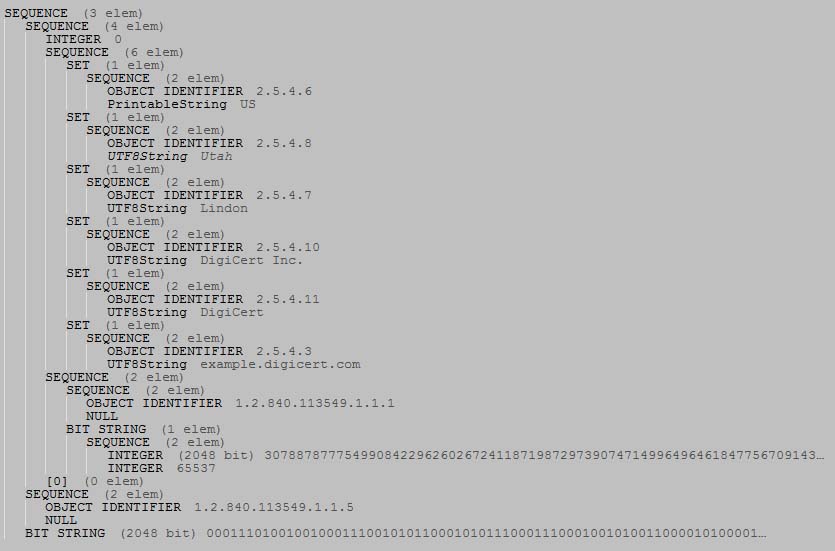
This example will create ASN.1 having this structure and content:
Chilkat Dart Downloads
import 'package:chilkat/chilkat.dart';

void main() {
  // This example assumes the Chilkat API to have been previously unlocked.
  // See Global Unlock Sample for sample code.

  // A new ASN.1 object is automatically a SEQUENCE.
  // Given that the CSR's root item is a SEQUENCE, we can use
  // this as the root of our CSR.
  final asnRoot = CkAsn();

  // Beneath the root, we have a SEQUENCE (the certificate request info),
  // another SEQUENCE (the algorithm identifier), and a BITSTRING (this signature data)

  asnRoot.appendSequence();
  asnRoot.appendSequence();
  asnRoot.appendBits('1D2472B15C7129850E6C68C7435ED35508A92B03A8780BF979874D7270ADEE83849499C1BBC4B4E2B41B7F9DAF816CD755AE50DB79A9C2ECC796BCBA4E06E80287333BA12EC27B5D98E09905C6102A58438982DF24F7668086A485DBC3E88FDE598411781A40BD13C792C597FA2429B298C08A8D8B229638C8FB651FF0C5683F643191B39E71BA878B0C9FD94457FD6C8F8868251DD58ADF61C1C89771BCEC0BFEAF8F58570A910D3D150D5EEE2E0AA7DBD5C8D4FA5550D08F4069FDA7F797E90A3BBE90DA3F26D1B40D91ED72CA8D0685F685D678252ACB586F25A73D4053B6F7B39BD5A9691CFA19EE65A212E2708C13E28BA6BD33D1B7D27528DFD9418B5C', 'hex');

  // ----------------------------------
  // Build the Certificate Request Info
  // ----------------------------------
  final asnCertReqInfo = asnRoot.getSubItem(0);
  asnCertReqInfo.appendInt(0);

  // Build the Subject part of the Certificate Request Info
  final asnCertSubject = asnCertReqInfo.appendSequenceR();

  // Add each subject part..
  var asnTemp = asnCertSubject.appendSetR();
  asnTemp.appendSequence2();
  // AppendSequence2 updates the internal reference to the newly appended SEQUENCE.
  // The OID and printable string are added to the SEQUENCE.
  asnTemp.appendOid('2.5.4.6');
  asnTemp.appendString('printable', 'US');

  asnTemp = asnCertSubject.appendSetR();
  asnTemp.appendSequence2();
  asnTemp.appendOid('2.5.4.8');
  asnTemp.appendString('utf8', 'Utah');

  asnTemp = asnCertSubject.appendSetR();
  asnTemp.appendSequence2();
  asnTemp.appendOid('2.5.4.7');
  asnTemp.appendString('utf8', 'Lindon');

  asnTemp = asnCertSubject.appendSetR();
  asnTemp.appendSequence2();
  asnTemp.appendOid('2.5.4.10');
  asnTemp.appendString('utf8', 'DigiCert Inc.');

  asnTemp = asnCertSubject.appendSetR();
  asnTemp.appendSequence2();
  asnTemp.appendOid('2.5.4.11');
  asnTemp.appendString('utf8', 'DigiCert');

  asnTemp = asnCertSubject.appendSetR();
  asnTemp.appendSequence2();
  asnTemp.appendOid('2.5.4.3');
  asnTemp.appendString('utf8', 'example.digicert.com');

  // Build the Public Key Info part of the Certificate Request Info
  final asnPubKeyInfo = asnCertReqInfo.appendSequenceR();

  final asnPubKeyAlgId = asnPubKeyInfo.appendSequenceR();
  asnPubKeyAlgId.appendOid('1.2.840.113549.1.1.1');
  asnPubKeyAlgId.appendNull();

  // The public key itself is a BIT STRING, but the bit string is composed of ASN.1
  // for the RSA public key.  We'll first build the RSA ASN.1 for the public key
  // (containing the 2048 bit modulus and exponent), and encoded it to DER, and then add
  // the DER bytes as a BIT STRING (as a sub-item of asnPubKeyInfo)

  // This is already a SEQUENCE..
  final asnRsaKey = CkAsn();

  // The RSA modulus is a big integer.
  asnRsaKey.appendBigInt('F3E4E8EDDFB690F59E06FFE8AD4DCB55B2700EB4906DE29A9829A8C29E5BA83C48C15DB4CEA45BEC03D438A62854414538442CE93EA02269C8A2585B887EA6E33819FC23EF5813A465CF9CD4FA36126BC1CFE003E6C05D4F993319003A35B5B264695DC51B6134B3ACD5E7CE85D9D616E848D7ADAA99C7E5829888583BB0AB80BD7FE62478984D9FD745E7EA309BC70E4260EB57C34D7624EA8A7F2ADEA6001C72515B6F209495026644D9C0869247A72B050F136D8344D1D73E09A6B70CE224CF510EB075B34F1FA7D3329FA9C6E05E2E03271F82D5B8E9B583D104F64BF0301E5AE03C79BB9D553E38C84A7CD86F7AFC681C7FB177DF13317B4C9CF976BAA3', 'hex');
  asnRsaKey.appendInt(65537);

  final rsaKeyDerBase64 = asnRsaKey.getEncodedDer('base64');

  // Now add the RSA key DER as a BIT STRING.
  asnPubKeyInfo.appendBits(rsaKeyDerBase64, 'base64');

  // The last part of the certificate request info is an empty context-specific constructed item
  // with a tag equal to 0.
  asnCertReqInfo.appendContextConstructed(0);

  // ----------------------------------
  // Finally, add the algorithm identifier, which is the 2nd sub-item under the root.
  // ----------------------------------
  final asnAlgId = asnRoot.getSubItem(1);
  asnAlgId.appendOid('1.2.840.113549.1.1.5');
  asnAlgId.appendNull();

  // Write the CSR to a DER encoded binary file:
  try {
    asnRoot.writeBinaryDer('qa_output/csr.der');
  } on ChilkatException catch (e) {
    print(e.lastErrorText);
    return;
  }

  // It is also possible to get the CSR in base64 format:
  final csrBase64 = asnRoot.getEncodedDer('base64');

  print('Base64 CSR:');
  print(csrBase64);

  // To emit as PEM:
  // (Note: The pem.AddItem method was added in Chilkat v9.5.0.59)
  final pem = CkPem();
  pem.addItem('csr', 'base64', csrBase64);
  print('PEM:');
  print(pem.toPem());
}