C# Requires Chilkat v10.1.2+
C#
Salesforce OAuth2 Access Token
See more OAuth2 Examples
Demonstrates how to get a Salesforce OAuth2 access token from a desktop application or script.Chilkat C# Downloads
bool success = false;

//  To further clarify, see OAuth 2.0 Authorization Flow

Chilkat.OAuth2 oauth2 = new Chilkat.OAuth2();

//  This should be the port in the localhost callback URL for your connected app.
//  The callback URL would look like "http://localhost:3017/" if the port number is 3017.
oauth2.ListenPort = 3017;

oauth2.AuthorizationEndpoint = "https://login.salesforce.com/services/oauth2/authorize";
oauth2.TokenEndpoint = "https://login.salesforce.com/services/oauth2/token";

//  Replace this with your actual client ID (Consumer Key)
oauth2.ClientId = "CLIENT_ID";

//  We don't have to include the client secret.
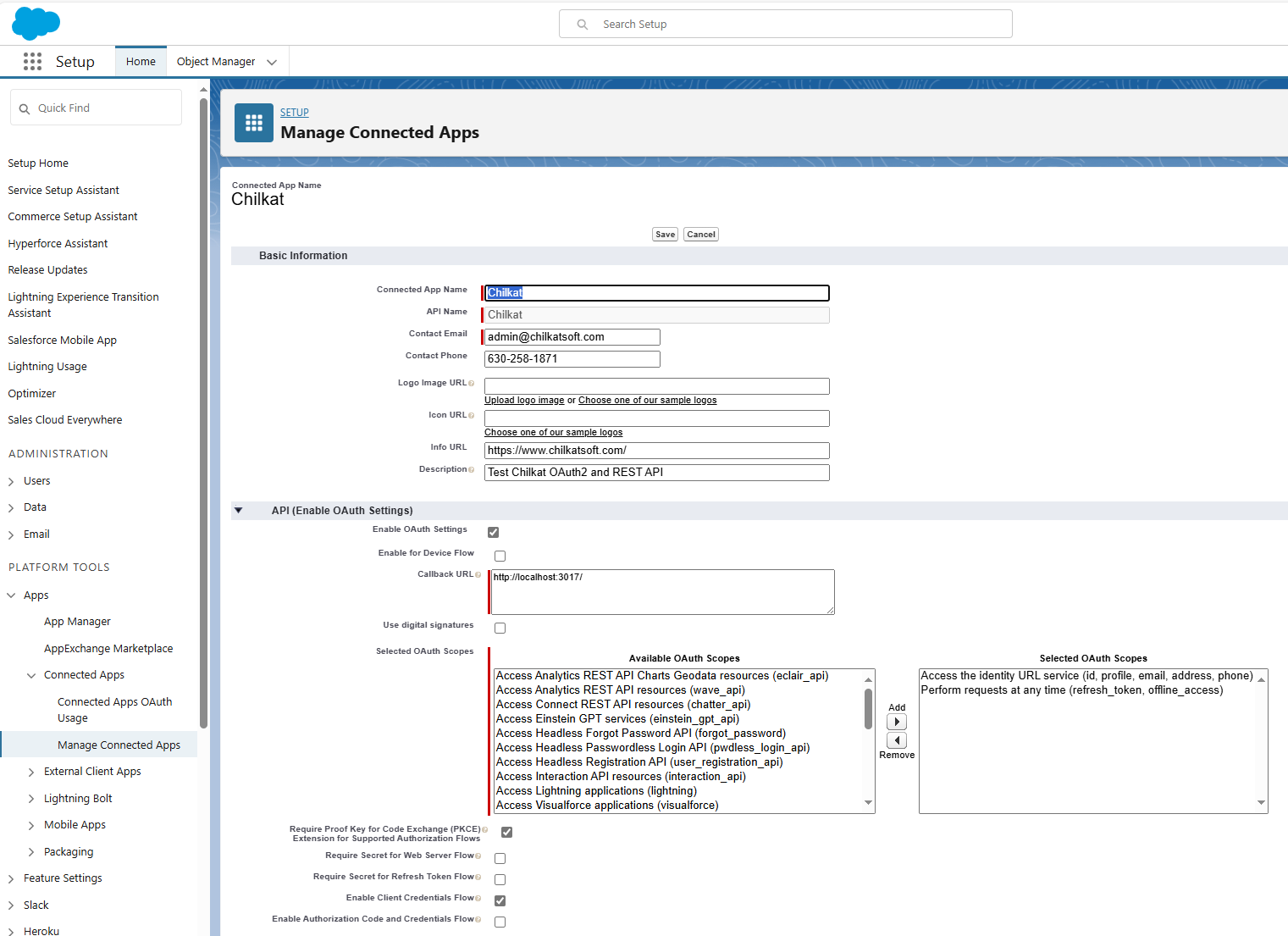
//  See the screenshot of our Connected App below..

//  This is for Require Proof Key for Code Exchange (PKCE)
//  See OAuth2 PKCE Explained
oauth2.CodeChallenge = true;
oauth2.CodeChallengeMethod = "S256";

//  To force the OAuth consent screen to reappear (even if previously granted), use:
oauth2.AddAuthQueryParam("prompt","consent");

//  Begin the OAuth2 authorization flow.  This returns a URL that should be loaded in a browser.
string url = oauth2.StartAuth();
if (oauth2.LastMethodSuccess != true) {
    Debug.WriteLine(oauth2.LastErrorText);
    return;
}

//  Launch the default browser on the system and navigate to the url.
//  The LaunchBrowser method was added in Chilkat v10.1.2.
success = oauth2.LaunchBrowser(url);
if (success == false) {
    Debug.WriteLine(oauth2.LastErrorText);
    return;
}

//  Wait for the user to approve or deny authorization in the browser.
int numMsWaited = 0;
while ((numMsWaited < 90000) && (oauth2.AuthFlowState < 3)) {
    oauth2.SleepMs(100);
    numMsWaited = numMsWaited + 100;
}

//  If the browser does not respond within the specified time, AuthFlowState will be:
//
//  1: Waiting for Redirect – The OAuth2 background thread is waiting for the browser's redirect request.
//  2: Waiting for Final Response – The thread is awaiting the final access token response.
//  In either case, cancel the background task initiated by StartAuth.

if (oauth2.AuthFlowState < 3) {
    oauth2.Cancel();
    Debug.WriteLine("No response from the browser!");
    return;
}

//  Check AuthFlowState to determine if authorization was granted, denied, or failed:
//
//  3: Success – OAuth2 flow completed, the background thread exited, and the successful response is in AccessTokenResponse.
//  4: Access Denied – OAuth2 flow completed, the background thread exited, and the error response is in AccessTokenResponse.
//  5: Failure – OAuth2 flow failed before completion, the background thread exited, and error details are in FailureInfo.

if (oauth2.AuthFlowState == 5) {
    Debug.WriteLine("OAuth2 failed to complete.");
    Debug.WriteLine(oauth2.FailureInfo);
    return;
}

if (oauth2.AuthFlowState == 4) {
    Debug.WriteLine("OAuth2 authorization was denied.");
    Debug.WriteLine(oauth2.AccessTokenResponse);
    return;
}

if (oauth2.AuthFlowState != 3) {
    Debug.WriteLine("Unexpected AuthFlowState:" + Convert.ToString(oauth2.AuthFlowState));
    return;
}

Debug.WriteLine("OAuth2 authorization granted!");
Debug.WriteLine("Access Token = " + oauth2.AccessToken);

//  Save the full JSON access token response to a file.
Chilkat.StringBuilder sbJson = new Chilkat.StringBuilder();
sbJson.Append(oauth2.AccessTokenResponse);
sbJson.WriteFile("qa_data/tokens/_salesforce.json","utf-8",false);

//  The saved JSON response looks like this:

//  {
//    "access_token": "00D41000....uLZBpT6",
//    "refresh_token": "5Aep....25xdGgkrV",
//    "signature": "cjTbSc5DvcKpaMoRTzuQTJLb1tcMw8LEO01flq4aMD4=",
//    "scope": "refresh_token id",
//    "instance_url": "https://d41000000f8a0eak-dev-ed.my.salesforce.com",
//    "id": "https://login.salesforce.com/id/00D41000000F8A0EAK/005410000....xAAE",
//    "token_type": "Bearer",
//    "issued_at": "1738348388166"
//  }

//  --------------------------------------------------------------------------
//  Here's a screenshot of a Salesforce Connected App
//  with the correct Callback URL for this example,
//  and also selects "Require Proof Key for Code Exchange (PKCE)"
//  and does not requires the secret for the authorization or refresh flow,
//  and also allows for the Client Credentials flow.
//