C#
C#
Get Firebase Access Token from JSON Service Account Private Key
See more Firebase Examples
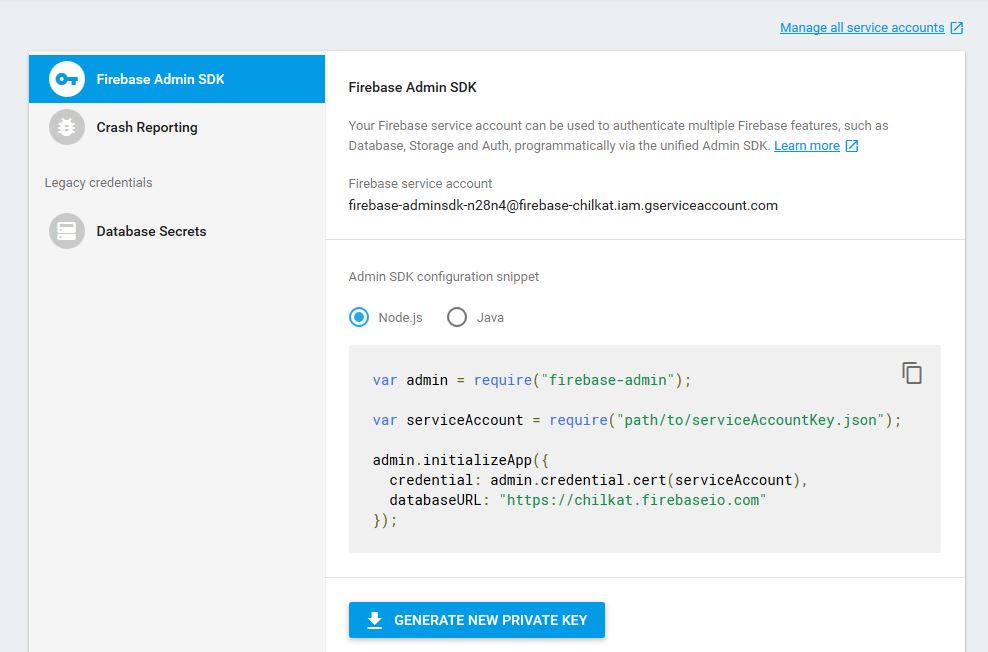
Demonstrates how to get a Firebase access token using a JSON service account private key. Your Firebase service account can be used to authenticate multiple Firebase features, such as Database, Storage and Auth, programmatically.A Firebase JSON service account private key can be created in the Firebase settings/admin portion of the console.firebase.google.com site as shown here:
Scroll down to see the example code...
Chilkat C# Downloads
bool success = false;

//  This example requires the Chilkat API to have been previously unlocked.
//  See Global Unlock Sample for sample code.

//  First load the Firebase JSON private key into a string.
Chilkat.FileAccess fac = new Chilkat.FileAccess();
string jsonKey = fac.ReadEntireTextFile("qa_data/firebase/firebase-chilkat-firebase-adminsdk-n28n4-1b664ee163.json","utf-8");
if (fac.LastMethodSuccess != true) {
    Debug.WriteLine(fac.LastErrorText);
    return;
}

//  A Firebase JSON private key should look something like this:

//  {
//    "type": "service_account",
//    "project_id": "firebase-chilkat",
//    "private_key_id": "1c664ee164907413c91ddefcf5b765ecba8779e2",
//    "private_key": "-----BEGIN PRIVATE KEY-----\nMIIEvQIBA ... Ya2UZii/lXn73/ZOK8=\n-----END PRIVATE KEY-----\n",
//    "client_email": "firebase-adminsdk-n28n4@firebase-chilkat.iam.gserviceaccount.com",
//    "client_id": "134846322329335418431",
//    "auth_uri": "https://accounts.google.com/o/oauth2/auth",
//    "token_uri": "https://accounts.google.com/o/oauth2/token",
//    "auth_provider_x509_cert_url": "https://www.googleapis.com/oauth2/v1/certs",
//    "client_x509_cert_url": "https://www.googleapis.com/robot/v1/metadata/x509/firebase-adminsdk-n28n4%40firebase-chilkat.iam.gserviceaccount.com"
//  }
//

Chilkat.AuthGoogle gAuth = new Chilkat.AuthGoogle();
gAuth.JsonKey = jsonKey;

//  Choose a scope.
//  The scope could be "https://www.googleapis.com/auth/firebase.database"
//  or a space-delimited list of scopes:
//  "https://www.googleapis.com/auth/firebase.database https://www.googleapis.com/auth/userinfo.email"

gAuth.Scope = "https://www.googleapis.com/auth/firebase.database https://www.googleapis.com/auth/userinfo.email";

//  Request an access token that is valid for this many seconds.
gAuth.ExpireNumSeconds = 3600;

//  If the application is requesting delegated access:
//  The email address of the user for which the application is requesting delegated access,
//  then set the email address here. (Otherwise leave it empty.)
gAuth.SubEmailAddress = "";

//  Connect to www.googleapis.com using TLS (TLS 1.2 is the default.)
//  The Chilkat socket object is used so that the connection can be established
//  through proxies or an SSH tunnel if desired.
Chilkat.Socket tlsSock = new Chilkat.Socket();
success = tlsSock.Connect("www.googleapis.com",443,true,5000);
if (success != true) {
    Debug.WriteLine(tlsSock.LastErrorText);
    return;
}

//  Send the request to obtain the access token.
success = gAuth.ObtainAccessToken(tlsSock);
if (success != true) {
    Debug.WriteLine(gAuth.LastErrorText);
    return;
}

//  Examine the access token:
Debug.WriteLine("Firebase Access Token: " + gAuth.AccessToken);

//  Save the token to a file (or wherever desired).  This token is valid for 1 hour.
fac.WriteEntireTextFile("qa_data/tokens/firebaseToken.txt",gAuth.AccessToken,"utf-8",false);