C++
C++
Gather Smartcard Debug Information for Chilkat
See more ScMinidriver Examples
This example demonstrates how to gather information to send to support@chilkatsoft.com about your smartcard.Chilkat C++ Downloads
#include <CkScMinidriver.h>
#include <CkJsonObject.h>
void ChilkatSample(void)
{
bool success = false;
// This example requires the Chilkat API to have been previously unlocked.
// See Global Unlock Sample for sample code.
// First, Chilkat recommends downloading the MGTEK Smartcard Minidriver Tool to get information
// about your smartcard.
// The tool can be downloaded from https://www.mgtek.com/smartcard
// --------------------------------------------------------------------------------------------------------
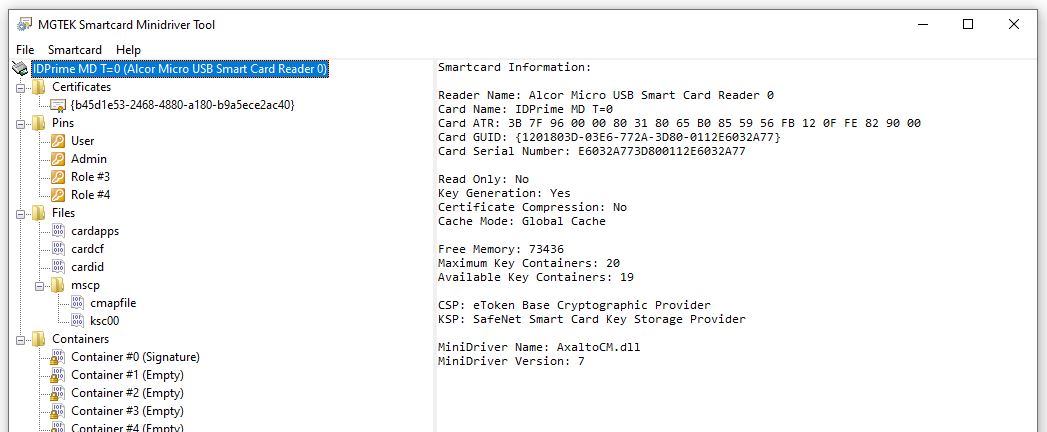
// 1. Select the smartcard as shown below and send Chilkat a screenshot of the basic smartcard information.
// --------------------------------------------------------------------------------------------------------
//
//  //
// --------------------------------------------------------------------------------------------------------
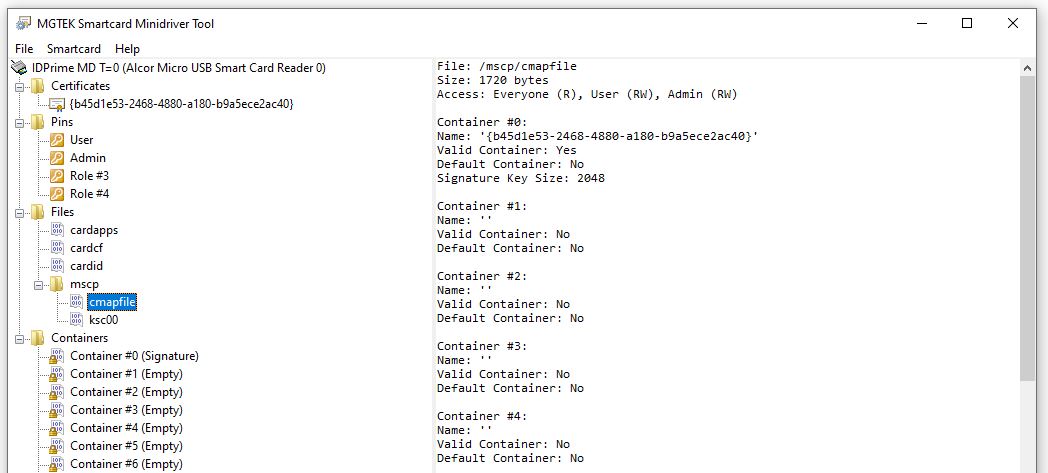
// 2. Select the cmapfile (if present) as shown below and send Chilkat a screenshot of the CSP container map
// --------------------------------------------------------------------------------------------------------
//
//
//
// --------------------------------------------------------------------------------------------------------
// 2. Select the cmapfile (if present) as shown below and send Chilkat a screenshot of the CSP container map
// --------------------------------------------------------------------------------------------------------
//
//  //
// ---------------------------------------------------------
// Chilkat provides functions to get information about the smartcard, and what it contains.
// Send Chilkat the output of the following source code:
CkScMinidriver scmd;
// Reader names (smart card readers or USB tokens) can be discovered
// via PCSC List Readers or PCSC Find Smart Cards
const char *readerName = "Alcor Micro USB Smart Card Reader 0";
success = scmd.AcquireContext(readerName);
if (success == false) {
std::cout << scmd.lastErrorText() << "\r\n";
return;
}
CkJsonObject json;
json.put_EmitCompact(false);
// ------------------------------------------------------
// 3. Send Chilkat the JSON returned by GetCardProperties
// ------------------------------------------------------
success = scmd.GetCardProperties(json);
if (success == false) {
std::cout << scmd.lastErrorText() << "\r\n";
return;
}
std::cout << json.emit() << "\r\n";
// ------------------------------------------------------
// 4. Send Chilkat the JSON returned by GetCspContainerMap
// ------------------------------------------------------
json.Clear();
success = scmd.GetCspContainerMap(json);
if (success == false) {
std::cout << scmd.lastErrorText() << "\r\n";
return;
}
std::cout << json.emit() << "\r\n";
}
//
// ---------------------------------------------------------
// Chilkat provides functions to get information about the smartcard, and what it contains.
// Send Chilkat the output of the following source code:
CkScMinidriver scmd;
// Reader names (smart card readers or USB tokens) can be discovered
// via PCSC List Readers or PCSC Find Smart Cards
const char *readerName = "Alcor Micro USB Smart Card Reader 0";
success = scmd.AcquireContext(readerName);
if (success == false) {
std::cout << scmd.lastErrorText() << "\r\n";
return;
}
CkJsonObject json;
json.put_EmitCompact(false);
// ------------------------------------------------------
// 3. Send Chilkat the JSON returned by GetCardProperties
// ------------------------------------------------------
success = scmd.GetCardProperties(json);
if (success == false) {
std::cout << scmd.lastErrorText() << "\r\n";
return;
}
std::cout << json.emit() << "\r\n";
// ------------------------------------------------------
// 4. Send Chilkat the JSON returned by GetCspContainerMap
// ------------------------------------------------------
json.Clear();
success = scmd.GetCspContainerMap(json);
if (success == false) {
std::cout << scmd.lastErrorText() << "\r\n";
return;
}
std::cout << json.emit() << "\r\n";
}