C++ Requires Chilkat v10.1.3+
C++
Datev OAuth2 Access Token
See more Datev Examples
Demonstrates how to get a Datev OAuth2 access token from a desktop application or script.Chilkat C++ Downloads
#include <CkOAuth2.h>
#include <CkStringBuilder.h>
void ChilkatSample(void)
{
bool success = false;
// To further clarify, see OAuth 2.0 Authorization Flow
CkOAuth2 oauth2;
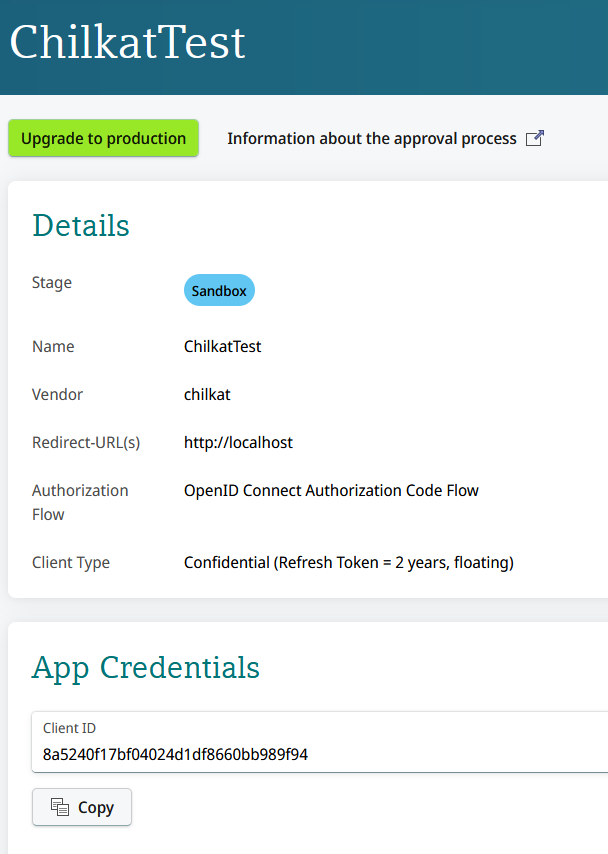
// Your Datev app should use "http://localhost" (no trailing forward slash) for the redirect URL.
oauth2.put_ListenPort(3017);
//  oauth2.put_AuthorizationEndpoint("https://login.datev.de/openidsandbox/authorize");
oauth2.put_TokenEndpoint("https://sandbox-api.datev.de/token");
// Replace this with your actual client ID.
oauth2.put_ClientId("DATEV_CLIENT_ID");
oauth2.put_ClientSecret("DATEV_CLIENT_SECRET");
oauth2.put_CodeChallenge(true);
oauth2.put_CodeChallengeMethod("S256");
oauth2.put_Scope("openid profile email datev:accounting:clients accounting:documents datev:accounting:extf-files-import");
// Begin the OAuth2 authorization code flow. This returns a URL that should be loaded in a browser.
const char *url = oauth2.startAuth();
if (oauth2.get_LastMethodSuccess() != true) {
std::cout << oauth2.lastErrorText() << "\r\n";
return;
}
// Launch the default browser on the system and navigate to the url.
// The LaunchBrowser method was added in Chilkat v10.1.2.
success = oauth2.LaunchBrowser(url);
if (success == false) {
std::cout << oauth2.lastErrorText() << "\r\n";
return;
}
// Wait for the interactive user to grant permission in the interactive browser session.
// We'll wait for a max of 90 seconds.
int numMsWaited = 0;
while ((numMsWaited < 90000) && (oauth2.get_AuthFlowState() < 3)) {
oauth2.SleepMs(100);
numMsWaited = numMsWaited + 100;
}
// If there was no response from the browser within 90 seconds, then
// the AuthFlowState will be equal to 1 or 2.
// 1: Waiting for Redirect. The OAuth2 background thread is waiting to receive the redirect HTTP request from the browser.
// 2: Waiting for Final Response. The OAuth2 background thread is waiting for the final access token response.
// In that case, cancel the background task started in the call to StartAuth.
if (oauth2.get_AuthFlowState() < 3) {
oauth2.Cancel();
std::cout << "No response from the browser!" << "\r\n";
return;
}
// Check the AuthFlowState to see if authorization was granted, denied, or if some error occurred
// The possible AuthFlowState values are:
// 3: Completed with Success. The OAuth2 flow has completed, the background thread exited, and the successful JSON response is available in AccessTokenResponse property.
// 4: Completed with Access Denied. The OAuth2 flow has completed, the background thread exited, and the error JSON is available in AccessTokenResponse property.
// 5: Failed Prior to Completion. The OAuth2 flow failed to complete, the background thread exited, and the error information is available in the FailureInfo property.
if (oauth2.get_AuthFlowState() == 5) {
std::cout << "OAuth2 failed to complete." << "\r\n";
std::cout << oauth2.failureInfo() << "\r\n";
return;
}
if (oauth2.get_AuthFlowState() == 4) {
std::cout << "OAuth2 authorization was denied." << "\r\n";
std::cout << oauth2.accessTokenResponse() << "\r\n";
return;
}
if (oauth2.get_AuthFlowState() != 3) {
std::cout << "Unexpected AuthFlowState:" << oauth2.get_AuthFlowState() << "\r\n";
return;
}
// Save the full JSON access token response to a file.
CkStringBuilder sbJson;
sbJson.Append(oauth2.accessTokenResponse());
sbJson.WriteFile("qa_data/tokens/datev.json","utf-8",false);
// The saved JSON response looks like this:
// {
// "refresh_token": "ZDA5Y .... FFhTXc9",
// "refresh_token_expires_in": 39600,
// "id_token": "eyJ .... Q9w",
// "access_token": "MTM .... 1UDA9",
// "token_type": "bearer",
// "expires_in": 900
// }
std::cout << "OAuth2 authorization granted!" << "\r\n";
std::cout << "Access Token = " << oauth2.accessToken() << "\r\n";
}
oauth2.put_AuthorizationEndpoint("https://login.datev.de/openidsandbox/authorize");
oauth2.put_TokenEndpoint("https://sandbox-api.datev.de/token");
// Replace this with your actual client ID.
oauth2.put_ClientId("DATEV_CLIENT_ID");
oauth2.put_ClientSecret("DATEV_CLIENT_SECRET");
oauth2.put_CodeChallenge(true);
oauth2.put_CodeChallengeMethod("S256");
oauth2.put_Scope("openid profile email datev:accounting:clients accounting:documents datev:accounting:extf-files-import");
// Begin the OAuth2 authorization code flow. This returns a URL that should be loaded in a browser.
const char *url = oauth2.startAuth();
if (oauth2.get_LastMethodSuccess() != true) {
std::cout << oauth2.lastErrorText() << "\r\n";
return;
}
// Launch the default browser on the system and navigate to the url.
// The LaunchBrowser method was added in Chilkat v10.1.2.
success = oauth2.LaunchBrowser(url);
if (success == false) {
std::cout << oauth2.lastErrorText() << "\r\n";
return;
}
// Wait for the interactive user to grant permission in the interactive browser session.
// We'll wait for a max of 90 seconds.
int numMsWaited = 0;
while ((numMsWaited < 90000) && (oauth2.get_AuthFlowState() < 3)) {
oauth2.SleepMs(100);
numMsWaited = numMsWaited + 100;
}
// If there was no response from the browser within 90 seconds, then
// the AuthFlowState will be equal to 1 or 2.
// 1: Waiting for Redirect. The OAuth2 background thread is waiting to receive the redirect HTTP request from the browser.
// 2: Waiting for Final Response. The OAuth2 background thread is waiting for the final access token response.
// In that case, cancel the background task started in the call to StartAuth.
if (oauth2.get_AuthFlowState() < 3) {
oauth2.Cancel();
std::cout << "No response from the browser!" << "\r\n";
return;
}
// Check the AuthFlowState to see if authorization was granted, denied, or if some error occurred
// The possible AuthFlowState values are:
// 3: Completed with Success. The OAuth2 flow has completed, the background thread exited, and the successful JSON response is available in AccessTokenResponse property.
// 4: Completed with Access Denied. The OAuth2 flow has completed, the background thread exited, and the error JSON is available in AccessTokenResponse property.
// 5: Failed Prior to Completion. The OAuth2 flow failed to complete, the background thread exited, and the error information is available in the FailureInfo property.
if (oauth2.get_AuthFlowState() == 5) {
std::cout << "OAuth2 failed to complete." << "\r\n";
std::cout << oauth2.failureInfo() << "\r\n";
return;
}
if (oauth2.get_AuthFlowState() == 4) {
std::cout << "OAuth2 authorization was denied." << "\r\n";
std::cout << oauth2.accessTokenResponse() << "\r\n";
return;
}
if (oauth2.get_AuthFlowState() != 3) {
std::cout << "Unexpected AuthFlowState:" << oauth2.get_AuthFlowState() << "\r\n";
return;
}
// Save the full JSON access token response to a file.
CkStringBuilder sbJson;
sbJson.Append(oauth2.accessTokenResponse());
sbJson.WriteFile("qa_data/tokens/datev.json","utf-8",false);
// The saved JSON response looks like this:
// {
// "refresh_token": "ZDA5Y .... FFhTXc9",
// "refresh_token_expires_in": 39600,
// "id_token": "eyJ .... Q9w",
// "access_token": "MTM .... 1UDA9",
// "token_type": "bearer",
// "expires_in": 900
// }
std::cout << "OAuth2 authorization granted!" << "\r\n";
std::cout << "Access Token = " << oauth2.accessToken() << "\r\n";
}