C++
C++
Apple Keychain - Import ECDSA Private Key
See more Apple Keychain Examples
Imports an ECDSA private key to the Apple Keychain.Note: This example requires Chilkat v10.0.0 or greater.
Chilkat C++ Downloads
#include <CkPrivateKey.h>
void ChilkatSample(void)
{
bool success = false;
const char *pemPath = "/Users/chilkat/qa_data/ecc/prime256v1-privKey.pem";
// Provide a password if your PEM is encrypted. Otherwise pass the empty string.
const char *pemPassword = "";
CkPrivateKey privKey;
success = privKey.LoadAnyFormatFile(pemPath,pemPassword);
if (success == false) {
std::cout << privKey.lastErrorText() << "\r\n";
return;
}
// In Apple Keychain, the label for an item such as a private key is a user-friendly identifier that helps distinguish one item from
// another in the Keychain. It is typically a brief name or description associated with the item.
// The label is displayed in the Keychain Access application and is useful for quickly identifying the purpose
// or source of a specific key, certificate, or password entry.
// The label does not affect the functionality or security of the item; it is purely for organizational purposes.
// You can edit or assign labels to make your Keychain easier to navigate.
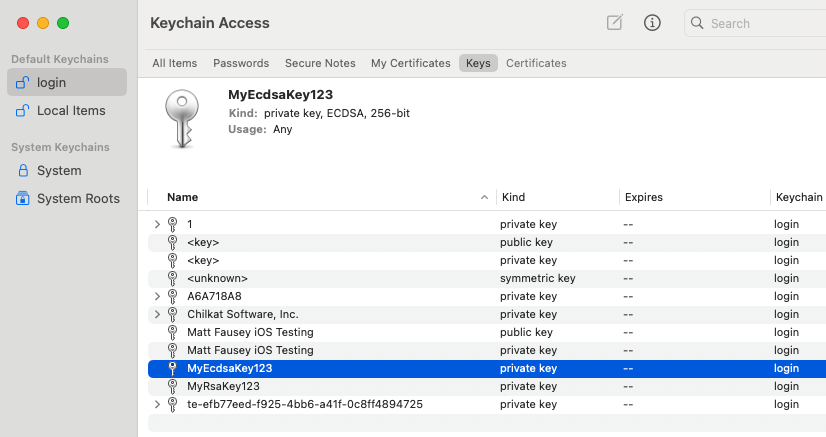
// On MacOS, you can save the private key to the Keychain by calling SavePkcs8File with a "filename" in the format"keychain:<label>"
success = privKey.SavePkcs8File("keychain:MyEcdsaKey123");
if (success == false) {
std::cout << privKey.lastErrorText() << "\r\n";
return;
}
std::cout << "Success." << "\r\n";
// Here you can see:
//
//  }
}