Chilkat2-Python
Chilkat2-Python
MIME -- Convert Base64 to Binary
See more MIME Examples
Loads MIME containing a base64 body and converts it to binary. This changes the Content-Transfer-Encoding header to "binary", and the body is stored as raw unencoded bytes.The MIME file initially loaded in this example contains:
Content-Disposition: attachment; filename="starfish20.jpg"
Content-Type: image/jpeg; name="starfish20.jpg"
Content-Transfer-Encoding: base64

/9j/4AAQSkZJRgABAQEASABIAAD//gAmRmlsZSB3cml0dGVuIGJ5IEFkb2JlIFBob3Rvc2hvcD8g
NC4w/9sAQwAQCwwODAoQDg0OEhEQExgoGhgWFhgxIyUdKDozPTw5Mzg3QEhcTkBEV0U3OFBtUVdf
YmdoZz5NcXlwZHhcZWdj/9sAQwEREhIYFRgvGhovY0I4QmNjY2NjY2NjY2NjY2NjY2NjY2NjY2Nj
Y2NjY2NjY2NjY2NjY2NjY2NjY2NjY2NjY2Nj/8IAEQgAFAAUAwERAAIRAQMRAf/EABcAAAMBAAAA
AAAAAAAAAAAAAAIDBAX/xAAYAQADAQEAAAAAAAAAAAAAAAABAgMEAP/aAAwDAQACEAMQAAAB2kZY
NNEijWKddfTmLgALWH//xAAbEAACAgMBAAAAAAAAAAAAAAABAgMRAAQSE//aAAgBAQABBQL0XqN+
pM2aqJGMiqFFCyg7z//EABwRAAICAgMAAAAAAAAAAAAAAAERAAIQIQMSUf/aAAgBAwEBPwHqU5aq
Axx+y1tMQl4elj//xAAcEQEAAQUBAQAAAAAAAAAAAAABEQACEBIhA1H/2gAIAQIBAT8B3Bhqy7Zc
enyiwmGgDhiOzj//xAAdEAABAwUBAAAAAAAAAAAAAAABAAIREBIhIkFR/9oACAEBAAY/ArZyn+Cg
xtxWuJaoCnqDuin/xAAcEAABBAMBAAAAAAAAAAAAAAABABEhYRAxQVH/2gAIAQEAAT8hkEwPUUR9
DYfE4nxtRpIkBTsayuALIiuY/9oADAMBAAIAAwAAABDWPTsf/8QAGhEAAwADAQAAAAAAAAAAAAAA
AAEREDFBIf/aAAgBAwEBPxC0DVPcWm+Ce4OesrkE6bjH/8QAGBEBAQEBAQAAAAAAAAAAAAAAAREA
QRD/2gAIAQIBAT8QahMiOc8YgSrnTY3ELclHXn//xAAcEAEBAAIDAQEAAAAAAAAAAAABEQAhMUFx
EFH/2gAIAQEAAT8Qn3igmSZSj+c4N4zapMy9IjFV98wncN2iuLFsCEbDGxQkI6RO/n//2Q==
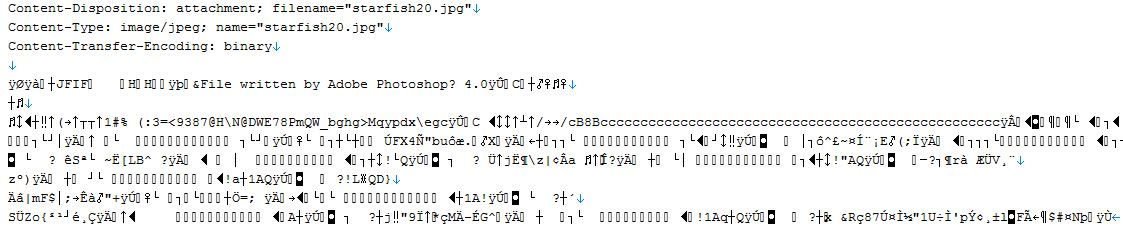
After converting, the binary MIME looks like the following. (Note: Loading it into a text editor and saving it will corrupt the binary data by dropping bytes. Non-text binary data CANNOT be handled as if it were text without corruption.)
Chilkat Python Downloads
import sys
import chilkat2

success = False

# This example requires the Chilkat API to have been previously unlocked.
# See Global Unlock Sample for sample code.

mime = chilkat2.Mime()

success = mime.LoadMimeFile("qa_data/mime/starfish20_base64.mim")
if (success != True):
    print(mime.LastErrorText)
    sys.exit()

# Show the MIME.  We can see the body is base64 encoded.
mimeStr = mime.GetMime()
print(mimeStr)

# Change the Content-Transfer-Encoding to "binary"
mime.SetHeaderField("Content-Transfer-Encoding","binary")

# Note: Now that the MIME's body is binary (JPG image data),
# we CANNOT get the MIME as a string.  We can only get it as bytes.

# mimeBytes is a memoryview
mimeBytes = mime.GetMimeBytes()

# We can save it to a file, and then examine it..
fac = chilkat2.FileAccess()
success = fac.WriteEntireFile("qa_data/mime/starfish20_binary.mim",mimeBytes)
if (success != True):
    print(fac.LastErrorText)
else:
    print("Saved binary MIME.")