B4X
B4X
PDF Signatures with Built-in SVG Graphics
See more PDF Signatures Examples
This example demonstrates the built-in SVG graphics that can be applied to the appearance when signing a PDF.Note: This example requires Chilkat v9.5.0.85 or greater.
Chilkat B4X Downloads
Dim success As Boolean = False
' This example requires the Chilkat API to have been previously unlocked.
' See Global Unlock Sample for sample code.
Dim pdf As ChilkatPdf
pdf.Initialize("pdf")
' Load a PDF to be signed.
' The "hello.pdf" is available at https://chilkatsoft.com/hello.pdf
success = pdf.LoadFile("qa_data/pdf/hello.pdf")
If success = False Then
Log(pdf.LastErrorText)
Return
End If
' Options for signing are specified in JSON.
Dim json As ChilkatJsonObject
json.Initialize
' In most cases, the signingCertificateV2 and signingTime attributes are required.
json.UpdateInt("signingCertificateV2", 1)
json.UpdateInt("signingTime", 1)
' Specify the location/position, scale, and content of the signature's appearance.
json.UpdateInt("page", 1)
json.UpdateString("appearance.y", "top")
json.UpdateString("appearance.x", "left")
json.UpdateString("appearance.fontScale", "10.0")
json.UpdateString("appearance.text[0]", "Digitally signed by: cert_cn")
json.UpdateString("appearance.text[1]", "current_dt")
json.UpdateString("appearance.text[2]", "The crazy brown fox jumps over the lazy dog.")
' In addition to the above, this example adds a built-in SVG graphic to the appearance.
' The built-in SVG graphic is specified by a name, such as "green-check-grey-circle".
' The full list of graphic names and images are shown below.
json.UpdateString("appearance.image", "green-check-grey-circle")
' The graphic can be placed "left", "center", or "right".
' If "center", then the graphic is displayed behind the text.
json.UpdateString("appearance.imagePlacement", "left")
' The graphic's opacity can range from 1 to 100.
' Centered graphics look best with less opacity (50 or less).
' In this example, we'll keep the opacity at 100.
json.UpdateString("appearance.imageOpacity", "100")
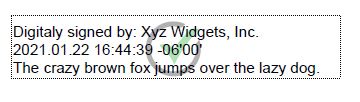
' Here's an example of the signature's appearance if we centered the SVG graphic with an opacity of 40%
'  ' Load the signing certificate. (Use your own certificate.)
Dim cert As ChilkatCert
cert.Initialize("cert")
success = cert.LoadPfxFile("qa_data/pfx/myPdfSigningCert.pfx", "secret")
If success = False Then
Log(cert.LastErrorText)
Return
End If
' Tell the pdf object to use the certificate for signing.
success = pdf.SetSigningCert(cert)
If success = False Then
Log(pdf.LastErrorText)
Return
End If
success = pdf.SignPdf(json, "qa_output/hello_signed.pdf")
If success = False Then
Log(pdf.LastErrorText)
Return
End If
Log("The PDF has been successfully cryptographically signed.")
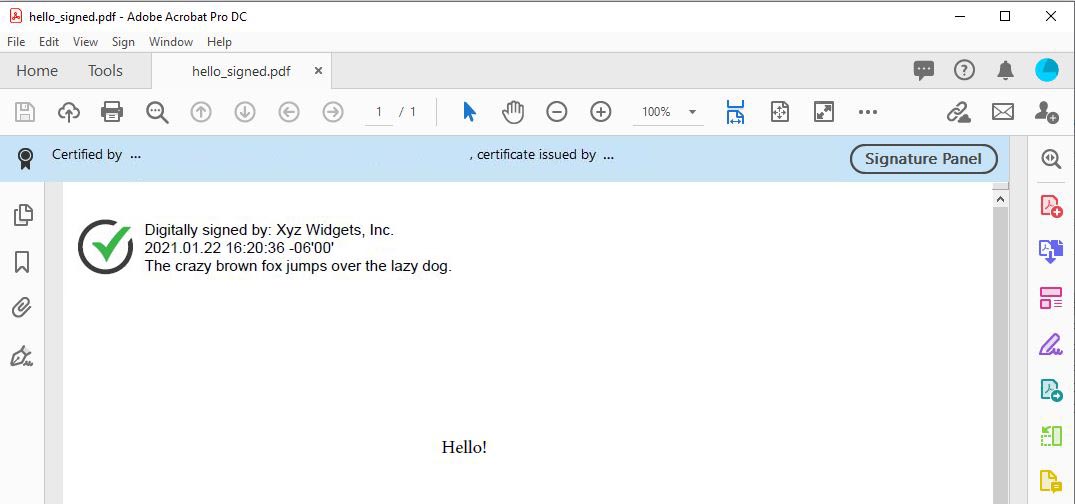
' The appearance of the signature appears in Adobe Acrobat as shown here:
'
' Load the signing certificate. (Use your own certificate.)
Dim cert As ChilkatCert
cert.Initialize("cert")
success = cert.LoadPfxFile("qa_data/pfx/myPdfSigningCert.pfx", "secret")
If success = False Then
Log(cert.LastErrorText)
Return
End If
' Tell the pdf object to use the certificate for signing.
success = pdf.SetSigningCert(cert)
If success = False Then
Log(pdf.LastErrorText)
Return
End If
success = pdf.SignPdf(json, "qa_output/hello_signed.pdf")
If success = False Then
Log(pdf.LastErrorText)
Return
End If
Log("The PDF has been successfully cryptographically signed.")
' The appearance of the signature appears in Adobe Acrobat as shown here:
'  ' The SVG icon graphics are embedded within the Chilkat library,
' and were graciously provided by uxwing - Free SVG Icons
'
' The uxwing licensing terms are reproduced here and can be verified at uxwing licensing
' Icons from uxwing.com are free (see https://uxwing.com/license/)
' - All icons on UXWing free to download, and use personal, commercial projects.
' - Attribution and Credit is NOT required, however, any credit will be much appreciated.
' - There is no limit to the number of times you can use.
' - You may modify the resources according to your requirements.
' The set of SVG names and the corresponding graphics are shown below.
'
' For example, if we specify "green-check-green-circle"
json.UpdateString("appearance.image", "green-check-green-circle")
' We get:
'
' The SVG icon graphics are embedded within the Chilkat library,
' and were graciously provided by uxwing - Free SVG Icons
'
' The uxwing licensing terms are reproduced here and can be verified at uxwing licensing
' Icons from uxwing.com are free (see https://uxwing.com/license/)
' - All icons on UXWing free to download, and use personal, commercial projects.
' - Attribution and Credit is NOT required, however, any credit will be much appreciated.
' - There is no limit to the number of times you can use.
' - You may modify the resources according to your requirements.
' The set of SVG names and the corresponding graphics are shown below.
'
' For example, if we specify "green-check-green-circle"
json.UpdateString("appearance.image", "green-check-green-circle")
' We get:
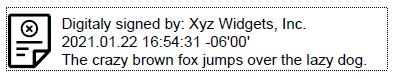
'  ' "application-approved"
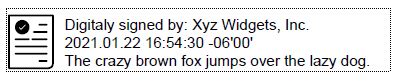
'
' "application-approved"
'  ' "application-rejected"
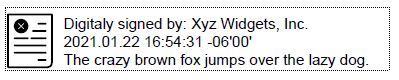
'
' "application-rejected"
'  ' "document-accepted"
'
' "document-accepted"
'  ' "approved"
'
' "approved"
'  ' "blue-check-mark"
'
' "blue-check-mark"
'  ' "green-check-mark"
'
' "green-check-mark"
'  ' "green-check-grey-circle"
'
' "green-check-grey-circle"
'  ' "red-x-red-circle"
'
' "red-x-red-circle"
'  ' "rejected"
'
' "rejected"
'  ' "result-failure"
'
' "result-failure"
'  ' "result-pass"
'
' "result-pass"
'  ' "signature"
'
' "signature"
'  ' "document-check"
'
' "document-check"
'  ' "document-x"
'
' "document-x"
'  ' "red-x-grey-circle"
'
' "red-x-grey-circle"
' 