AutoIt
AutoIt
XML Tree Traversal Order for Search* Methods
See more XML Examples
The Chilkat XML API provides a number of Search* methods for locating XML nodes based on criteria. These methods traverse an XML document in a breadth-first order. (See Breadth-First Search).The XML document used in this example has the following tree structure:
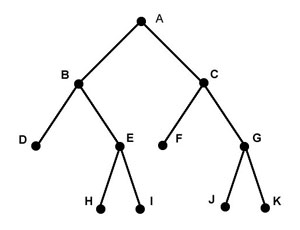
The nodes are traversed in the order: A, B, C, D, E, F, G, H, I, J, K.
The input XML, available at http://www.chilkatsoft.com/data/searchOrder.xml, is this:
<a>crocodileA
    <b>crocodileB
        <d>crocodileD</d>
        <e>crocodileE
            <h>crocodileH</h>
            <i>crocodileI</i>
        </e>
    </b>
    <c>crocodileC
        <f>crocodileF</f>
        <g>crocodileG
            <j>crocodileJ</j>
            <k>crocodileK</k>
        </g>
    </c>
</a>
Chilkat AutoIt Downloads
Local $bSuccess = False

$oXml = ObjCreate("Chilkat.Xml")
Local $oXBeginAfter
Local $oXFound

;  The sample input XML is available at http://www.chilkatsoft.com/data/searchOrder.xml
$bSuccess = $oXml.LoadXmlFile("searchOrder.xml")
If ($bSuccess <> True) Then
    ConsoleWrite($oXml.LastErrorText & @CRLF)
    Exit
EndIf

;  IMPORTANT:  The following loop for iterating over all
;  matching nodes performs reasonably well for small to
;  mid-size XML documents or sub-trees.  Performance
;  can be poor when the sub-tree contains many thousands
;  of nodes (or more).

;  NOTE:  The search is always rooted at the calling node.
;  In this example, it happens to also be the root node of the entire
;  XML document.  Searches can be performed on sub-trees
;  within the document by calling the Search* method from
;  the root node of a sub-tree.

;  Demonstrate the breadth-first traversal:
$oXBeginAfter = $oXml.GetSelf()
$oXFound = $oXml.SearchAllForContent($oXBeginAfter,"*croc*")
While ($oXml.LastMethodSuccess = True)

    ConsoleWrite($oXFound.Tag & @CRLF)

    $oXBeginAfter = $oXFound
    $oXFound = $oXml.SearchAllForContent($oXBeginAfter,"*croc*")
Wend