AutoIt
 AutoIt
Authorization Code Flow with PKCE for Native Apps
See more Okta OAuth/OIDC Examples
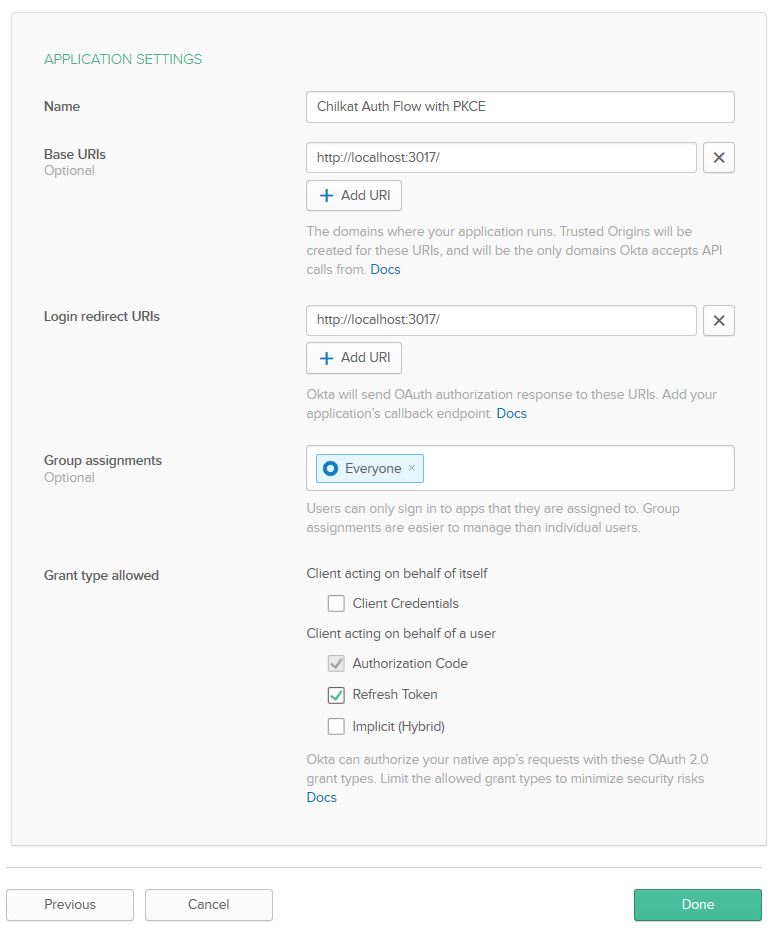
Demonstrates the authorization code flow with Proof Key for Code Exchange (PKCE) for native apps. In Okta, your app should be defined as shown:
Chilkat AutoIt Downloads
Local $bSuccess = False

;  This example requires the Chilkat API to have been previously unlocked.
;  See Global Unlock Sample for sample code.

$oOauth2 = ObjCreate("Chilkat.OAuth2")

;  This should be the port in the Login redirect URI for your app.
;  Your app's Login redirect URI should be "http://localhost:3017/" if the port number is 3017.
$oOauth2.ListenPort = 3017

$oOauth2.AuthorizationEndpoint = "https://{yourOktaDomain}/oauth2/default/v1/authorize"
$oOauth2.TokenEndpoint = "https://{yourOktaDomain}/oauth2/default/v1/token"

;  Replace these with actual values.
$oOauth2.ClientId = "OKTA_CLIENT_ID"
$oOauth2.ClientSecret = "OKTA_CLIENT_SECRET"

$oOauth2.CodeChallenge = True
$oOauth2.IncludeNonce = True

;  Make sure to include "offline_access" to get a refresh token included in the final JSON response.
;  Add any additional needed scopes separated by space chars.
$oOauth2.Scope = "openid offline_access"

;  Begin the OAuth2 three-legged flow.  This returns a URL that should be loaded in a browser.
Local $sUrl = $oOauth2.StartAuth()
If ($oOauth2.LastMethodSuccess = False) Then
    ConsoleWrite($oOauth2.LastErrorText & @CRLF)
    Exit
EndIf

ConsoleWrite("URL to load in browser: " & $sUrl & @CRLF)

;  Launch the system's default browser navigated to the URL.
$bSuccess = $oOauth2.LaunchBrowser($sUrl)
If ($bSuccess = False) Then
    ConsoleWrite($oOauth2.LastErrorText & @CRLF)
    Exit
EndIf

;  Now wait for the authorization.
;  We'll wait for a max of 60 seconds.
Local $iNumMsWaited = 0
While ($iNumMsWaited < 60000) And ($oOauth2.AuthFlowState < 3)
    $oOauth2.SleepMs 100
    $iNumMsWaited = $iNumMsWaited + 100
Wend

;  If there was no response from the browser within 30 seconds, then
;  the AuthFlowState will be equal to 1 or 2.
;  1: Waiting for Redirect. The OAuth2 background thread is waiting to receive the redirect HTTP request from the browser.
;  2: Waiting for Final Response. The OAuth2 background thread is waiting for the final access token response.
;  In that case, cancel the background task started in the call to StartAuth.
If ($oOauth2.AuthFlowState < 3) Then
    $oOauth2.Cancel()
    ConsoleWrite("No response from the browser!" & @CRLF)
    Exit
EndIf

;  Check the AuthFlowState to see if authorization was granted, denied, or if some error occurred
;  The possible AuthFlowState values are:
;  3: Completed with Success. The OAuth2 flow has completed, the background thread exited, and the successful JSON response is available in AccessTokenResponse property.
;  4: Completed with Access Denied. The OAuth2 flow has completed, the background thread exited, and the error JSON is available in AccessTokenResponse property.
;  5: Failed Prior to Completion. The OAuth2 flow failed to complete, the background thread exited, and the error information is available in the FailureInfo property.
If ($oOauth2.AuthFlowState = 5) Then
    ConsoleWrite("OAuth2 failed to complete." & @CRLF)
    ConsoleWrite($oOauth2.FailureInfo & @CRLF)
    Exit
EndIf

If ($oOauth2.AuthFlowState = 4) Then
    ConsoleWrite("OAuth2 authorization was denied." & @CRLF)
    ConsoleWrite($oOauth2.AccessTokenResponse & @CRLF)
    Exit
EndIf

If ($oOauth2.AuthFlowState <> 3) Then
    ConsoleWrite("Unexpected AuthFlowState:" & $oOauth2.AuthFlowState & @CRLF)
    Exit
EndIf

ConsoleWrite("OAuth2 authorization granted!" & @CRLF)
ConsoleWrite("Access Token = " & $oOauth2.AccessToken & @CRLF)

;  Get the full JSON response:
$oJson = ObjCreate("Chilkat.JsonObject")
$oJson.Load($oOauth2.AccessTokenResponse)
$oJson.EmitCompact = False
ConsoleWrite($oJson.Emit() & @CRLF)

;  The JSON response looks like this:

;  {
;    "access_token": "eyJraWQi ... Kn4IiEfOw",
;    "token_type": "Bearer",
;    "expires_in": 3600,
;    "scope": "offline_access openid",
;    "refresh_token": "0jCqotuuUegdjNzB9uuSsfGM2Cu5HnCHUxoJ0yhZ4rs",
;    "id_token": "eyJraWQiO ... 09WGEq3dTRmQF86PzJg"
;  }

;  Save the JSON to a file for future requests.
$oFac = ObjCreate("Chilkat.FileAccess")
$oFac.WriteEntireTextFile("qa_data/tokens/okta.json",$oJson.Emit(),"utf-8",False)