Classic ASP
Classic ASP
XML Tree Traversal Order for Search* Methods
See more XML Examples
The Chilkat XML API provides a number of Search* methods for locating XML nodes based on criteria. These methods traverse an XML document in a breadth-first order. (See Breadth-First Search).The XML document used in this example has the following tree structure:
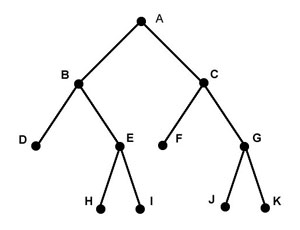
The nodes are traversed in the order: A, B, C, D, E, F, G, H, I, J, K.
The input XML, available at http://www.chilkatsoft.com/data/searchOrder.xml, is this:
<a>crocodileA
    <b>crocodileB
        <d>crocodileD</d>
        <e>crocodileE
            <h>crocodileH</h>
            <i>crocodileI</i>
        </e>
    </b>
    <c>crocodileC
        <f>crocodileF</f>
        <g>crocodileG
            <j>crocodileJ</j>
            <k>crocodileK</k>
        </g>
    </c>
</a>
Chilkat Classic ASP Downloads
<html>
<head>
<meta http-equiv="Content-Type" content="text/html; charset=utf-8">
</head>
<body>
<%
success = 0

set xml = Server.CreateObject("Chilkat.Xml")

'  The sample input XML is available at http://www.chilkatsoft.com/data/searchOrder.xml
success = xml.LoadXmlFile("searchOrder.xml")
If (success <> 1) Then
    Response.Write "<pre>" & Server.HTMLEncode( xml.LastErrorText) & "</pre>"
    Response.End
End If

'  IMPORTANT:  The following loop for iterating over all
'  matching nodes performs reasonably well for small to
'  mid-size XML documents or sub-trees.  Performance
'  can be poor when the sub-tree contains many thousands
'  of nodes (or more).

'  NOTE:  The search is always rooted at the calling node.
'  In this example, it happens to also be the root node of the entire
'  XML document.  Searches can be performed on sub-trees
'  within the document by calling the Search* method from
'  the root node of a sub-tree.

'  Demonstrate the breadth-first traversal:
' xBeginAfter is a Chilkat.Xml
Set xBeginAfter = xml.GetSelf()
' xFound is a Chilkat.Xml
Set xFound = xml.SearchAllForContent(xBeginAfter,"*croc*")
Do While (xml.LastMethodSuccess = 1)

    Response.Write "<pre>" & Server.HTMLEncode( xFound.Tag) & "</pre>"

    ' xBeginAfter is a Chilkat.Xml
    Set xBeginAfter = xFound
    ' xFound is a Chilkat.Xml
    Set xFound = xml.SearchAllForContent(xBeginAfter,"*croc*")
Loop


%>
</body>
</html>