Classic ASP Requires Chilkat v11.7.0+
Classic ASP
QR Code Error Correction Levels
See more QR Code Examples
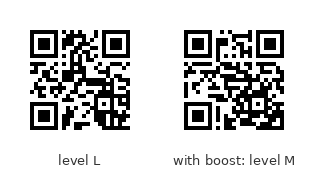
Demonstrates the four QR error-correction levels. L, M, Q and H allow a reader to recover the data when about 7%, 15%, 25% and 30% of the symbol is damaged or covered. More error correction leaves less room for data, so the same text needs a larger symbol at a higher level. The default is M. The example also shows boostErrorCorrection, which raises the level for free when the chosen version has room to spare.Chilkat Classic ASP Downloads
<html>
<head>
<meta http-equiv="Content-Type" content="text/html; charset=utf-8">
</head>
<body>
<%
success = 0
' This example requires the Chilkat API to have been previously unlocked.
' See Global Unlock Sample for sample code.
set fmt = Server.CreateObject("Chilkat.Formats")
set json = Server.CreateObject("Chilkat.JsonObject")
set jsonOut = Server.CreateObject("Chilkat.JsonObject")
success = json.UpdateString("payload.text","https://www.chilkatsoft.com/barcode_overview.asp")
' Encode the same text at each level.
set levels = Server.CreateObject("Chilkat.JsonArray")
success = levels.Load("[""L"",""M"",""Q"",""H""]")
For i = 0 To 3
success = json.UpdateString("encoding.qr.errorCorrection",levels.StringAt(i))
success = fmt.QrCode("generate",json,jsonOut)
If (success = 0) Then
Response.Write "<pre>" & Server.HTMLEncode( fmt.LastErrorText) & "</pre>"
Response.End
End If
Response.Write "<pre>" & Server.HTMLEncode( "level " & levels.StringAt(i) & ": version " & jsonOut.IntOf("symbols[0].selectedEncoding.version") & ", " & jsonOut.IntOf("symbols[0].dimensions.modulesWide") _
& " modules wide") & "</pre>"
Next
' The four symbols. They hold the same text, and the higher the level, the larger the symbol:
' 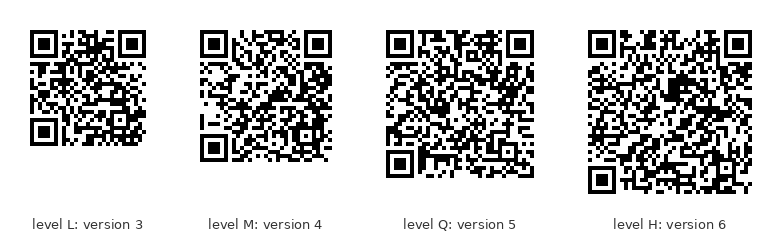 ' A symbol often has room left over. boostErrorCorrection uses it: the level is raised
' as far as the same version allows, so the symbol is no larger but is more robust.
set json2 = Server.CreateObject("Chilkat.JsonObject")
success = json2.UpdateString("payload.text","https://chilkatsoft.com")
success = json2.UpdateString("encoding.qr.errorCorrection","L")
success = fmt.QrCode("generate",json2,jsonOut)
If (success = 0) Then
Response.Write "<pre>" & Server.HTMLEncode( fmt.LastErrorText) & "</pre>"
Response.End
End If
Response.Write "<pre>" & Server.HTMLEncode( "level L requested: version " & jsonOut.IntOf("symbols[0].selectedEncoding.version") & ", level " & jsonOut.StringOf("symbols[0].selectedEncoding.errorCorrection")) & "</pre>"
success = json2.UpdateBool("encoding.qr.boostErrorCorrection",1)
success = fmt.QrCode("generate",json2,jsonOut)
If (success = 0) Then
Response.Write "<pre>" & Server.HTMLEncode( fmt.LastErrorText) & "</pre>"
Response.End
End If
Response.Write "<pre>" & Server.HTMLEncode( "level L with boost: version " & jsonOut.IntOf("symbols[0].selectedEncoding.version") & ", level " & jsonOut.StringOf("symbols[0].selectedEncoding.errorCorrection")) & "</pre>"
' Level L, and level M reached by the boost. The two symbols are the same size:
'
 ' Sample output:
' level L: version 3, 29 modules wide
' level M: version 4, 33 modules wide
' level Q: version 5, 37 modules wide
' level H: version 6, 41 modules wide
' level L requested: version 2, level L
' level L with boost: version 2, level M
%>
</body>
</html>