Android™ Requires Chilkat v11.7.0+
Android™
QR Code Quiet Zone, Padding and Rotation
See more QR Code Examples
Demonstrates the space around a QR code and its rotation. The quiet zone is the blank margin a reader needs around the symbol. It is measured in modules, the QR standard requires 4, and QrCode will make it larger but not smaller. Padding is extra space outside the quiet zone, measured in the render units (pixels by default). Rotation turns the whole image by 90, 180 or 270 degrees. A QR code reads the same at any rotation.Chilkat Android™ Downloads
// Important: Don't forget to include the call to System.loadLibrary
// as shown at the bottom of this code sample.
package com.test;
import android.app.Activity;
import com.chilkatsoft.*;
import android.widget.TextView;
import android.os.Bundle;
public class SimpleActivity extends Activity {
private static final String TAG = "Chilkat";
// Called when the activity is first created.
@Override
public void onCreate(Bundle savedInstanceState) {
super.onCreate(savedInstanceState);
boolean success = false;
// This example requires the Chilkat API to have been previously unlocked.
// See Global Unlock Sample for sample code.
CkJsonObject json = new CkJsonObject();
json.UpdateString("payload.text","https://www.chilkatsoft.com/");
json.UpdateInt("render.moduleSize",6);
// A quiet zone of 6 modules on every side instead of the standard 4.
json.UpdateInt("render.quietZone.left",6);
json.UpdateInt("render.quietZone.top",6);
json.UpdateInt("render.quietZone.right",6);
json.UpdateInt("render.quietZone.bottom",6);
// 10 more pixels of background around that.
json.UpdateInt("render.padding",10);
// Turn the image a quarter turn clockwise.
json.UpdateInt("render.rotation",90);
json.UpdateString("output.path","qa_output/qr_margins.png");
json.UpdateBool("output.overwrite",true);
json.UpdateString("output.return","none");
CkFormats fmt = new CkFormats();
CkJsonObject jsonOut = new CkJsonObject();
success = fmt.QrCode("generate",json,jsonOut);
if (success == false) {
Log.i(TAG, fmt.lastErrorText());
return;
}
Log.i(TAG, "module: " + String.valueOf(jsonOut.IntOf("measurements[0].pitch")) + " pixels");
Log.i(TAG, "symbol: " + String.valueOf(jsonOut.IntOf("measurements[0].symbolWidth")) + " x " + String.valueOf(jsonOut.IntOf("measurements[0].symbolHeight")) + " pixels at ("
+ String.valueOf(jsonOut.IntOf("measurements[0].symbolX")) + "," + String.valueOf(jsonOut.IntOf("measurements[0].symbolY")) + ")");
Log.i(TAG, "quiet zone: " + String.valueOf(jsonOut.IntOf("measurements[0].quietZonePx.left")) + " pixels");
Log.i(TAG, "padding: " + String.valueOf(jsonOut.IntOf("measurements[0].paddingPx")) + " pixels");
Log.i(TAG, "rotation: " + String.valueOf(jsonOut.IntOf("measurements[0].rotation")));
Log.i(TAG, "image: " + String.valueOf(jsonOut.IntOf("measurements[0].canvasWidth")) + " x " + String.valueOf(jsonOut.IntOf("measurements[0].canvasHeight")) + " pixels");
// The image, enlarged, with the quiet zone and the padding tinted here to show where they are.
// In the image itself both are plain white. A QR code has no finder pattern (the large squares)
// in its bottom right corner. After the quarter turn that corner is at the bottom left:
// 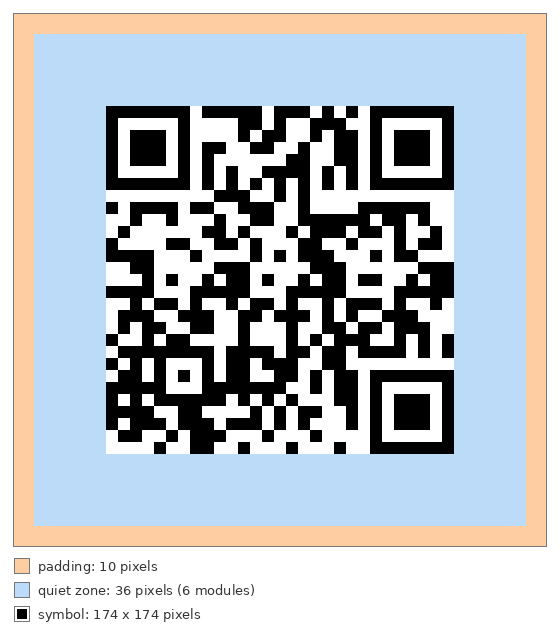 // Sample output:
// module: 6 pixels
// symbol: 174 x 174 pixels at (46,46)
// quiet zone: 36 pixels
// padding: 10 pixels
// rotation: 90
// image: 266 x 266 pixels
}
static {
System.loadLibrary("chilkat");
// Note: If the incorrect library name is passed to System.loadLibrary,
// then you will see the following error message at application startup:
//"The application <your-application-name> has stopped unexpectedly. Please try again."
}
}