Visual Basic 6.0 Requires Chilkat v11.7.0+
Visual Basic 6.0
Measure a QR Code without Rendering It
See more QR Code Examples
Demonstrates the measure operation, which does everything generate does except draw the image. It reports the version chosen and the exact size the image would have, which is useful for laying out a page or a label before any image is made. Unlike generate, a code that does not fit the limits is not a failure for measure: the call succeeds, fits is false, and reasons[] says why.Chilkat Visual Basic 6.0 Downloads
Dim success As Long
success = 0
' This example requires the Chilkat API to have been previously unlocked.
' See Global Unlock Sample for sample code.
Dim json As New ChilkatJsonObject
success = json.UpdateString("payload.text","https://www.chilkatsoft.com/barcode_overview.asp")
success = json.UpdateInt("render.moduleSize",8)
Dim fmt As New ChilkatFormats
Dim jsonOut As New ChilkatJsonObject
success = fmt.QrCode("measure",json,jsonOut)
If (success = 0) Then
Debug.Print fmt.LastErrorText
Exit Sub
End If
Debug.Print "fits: " & jsonOut.BoolOf("fits")
Debug.Print "QR version: " & jsonOut.IntOf("symbols[0].selectedEncoding.version")
Debug.Print "image would be: " & jsonOut.IntOf("measurements[0].canvasWidth") & " x " & jsonOut.IntOf("measurements[0].canvasHeight") & " pixels"
Debug.Print "symbol: " & jsonOut.IntOf("measurements[0].symbolWidth") & " pixels wide at x = " & jsonOut.IntOf("measurements[0].symbolX")
' Would it fit in a space 200 pixels wide?
success = json.UpdateInt("render.maxWidth",200)
success = fmt.QrCode("measure",json,jsonOut)
If (success = 0) Then
Debug.Print fmt.LastErrorText
Exit Sub
End If
Debug.Print "within 200 pixels, fits: " & jsonOut.BoolOf("fits")
If (jsonOut.BoolOf("fits") = 0) Then
Debug.Print "reason: " & jsonOut.StringOf("reasons[0].code") & " (" & jsonOut.StringOf("reasons[0].message") & ")"
End If
' What measure reported, drawn as a diagram. The measure operation itself makes no image:
' 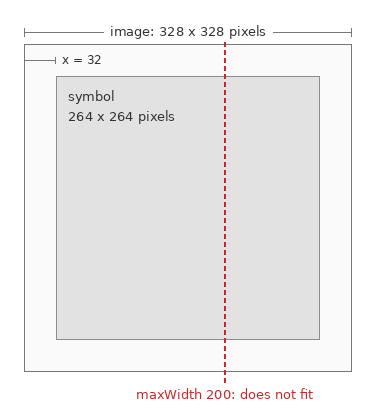 ' Sample output:
' fits: True
' QR version: 4
' image would be: 328 x 328 pixels
' symbol: 264 pixels wide at x = 32
' within 200 pixels, fits: False
' reason: noFit (exceedsMaxWidth)