SQL Server
SQL Server
Sign PDF and Provide Certificates in Chain to Root
See more PDF Signatures Examples
Discusses how to provide certificates in the chain of authentication to the root certificate if the certs are not available to Chilkat.If you provided a .p12 or .pfx, then it is likely the .p12/.pfx already contains the certs in the chain of authentication, and Chilkat will automatically find them.
Also, if running on a Windows system, then Chilkat will likely automatically find the intermediate CA certs and root CA cert as needed.
This example demonstrates how to explicitly provide the CA certs in the chain of authentication to any Chilkat application that is signing.
Note: This example requires Chilkat v9.5.0.92 or greater.
Chilkat SQL Server Downloads
--
CREATE PROCEDURE ChilkatSample
AS
BEGIN
DECLARE @hr int
DECLARE @sTmp0 nvarchar(4000)
DECLARE @success int
SELECT @success = 0
-- This example requires the Chilkat API to have been previously unlocked.
-- See Global Unlock Sample for sample code.
-- Assuming you don't have the intermediate CA and root CA certificates for the chain of authentication, then you'll need to locate them from your CA, download, and then use as shown below.
-- For example, if your certificate has this certification path:
-- 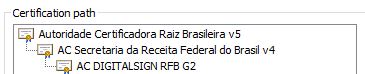 -- Then you should Google "AC DIGITALSIGN RFB G2".
-- In this case, the resulting URL found by Google is: https://www.digitalsigncertificadora.com.br/repositorio/RFB
-- You can download the certs from https://www.digitalsigncertificadora.com.br/repositorio/rfb/ACDIGITALSIGNRFB.p7b
-- Load the certs from a .p7b into an XML certificate vault.
-- Note: This example requires Chilkat v9.5.0.92 or greater. The ability to load .p7b files containing multiple certificates was added in v9.5.0.92
DECLARE @vault int
EXEC @hr = sp_OACreate 'Chilkat.XmlCertVault', @vault OUT
IF @hr <> 0
BEGIN
PRINT 'Failed to create ActiveX component'
RETURN
END
EXEC sp_OAMethod @vault, 'AddCertFile', @success OUT, 'qa_data/certs/ACDIGITALSIGNRFB.p7b'
IF @success = 0
BEGIN
EXEC sp_OAGetProperty @vault, 'LastErrorText', @sTmp0 OUT
PRINT @sTmp0
EXEC @hr = sp_OADestroy @vault
RETURN
END
-- -----------------------------------
-- See how the vault is used below...
-- -----------------------------------
-- The signed PDF produced by this example should be verifiable at https://verificador.iti.gov.br/verifier-2.6.2/
DECLARE @pdf int
EXEC @hr = sp_OACreate 'Chilkat.Pdf', @pdf OUT
-- Load a PDF to be signed.
-- The "hello.pdf" is available at https://chilkatsoft.com/hello.pdf
EXEC sp_OAMethod @pdf, 'LoadFile', @success OUT, 'qa_data/pdf/hello.pdf'
IF @success = 0
BEGIN
EXEC sp_OAGetProperty @pdf, 'LastErrorText', @sTmp0 OUT
PRINT @sTmp0
EXEC @hr = sp_OADestroy @vault
EXEC @hr = sp_OADestroy @pdf
RETURN
END
DECLARE @json int
EXEC @hr = sp_OACreate 'Chilkat.JsonObject', @json OUT
-- Define the appearance and location of the signature.
EXEC sp_OAMethod @json, 'UpdateInt', @success OUT, 'page', 1
EXEC sp_OAMethod @json, 'UpdateString', @success OUT, 'appearance.y', 'bottom'
EXEC sp_OAMethod @json, 'UpdateString', @success OUT, 'appearance.x', 'middle'
EXEC sp_OAMethod @json, 'UpdateString', @success OUT, 'appearance.fontScale', '9.0'
EXEC sp_OAMethod @json, 'UpdateString', @success OUT, 'appearance.text[0]', 'Digitally signed by: cert_cn'
EXEC sp_OAMethod @json, 'UpdateString', @success OUT, 'appearance.text[1]', 'current_dt'
EXEC sp_OAMethod @json, 'UpdateString', @success OUT, 'appearance.image', 'document-accepted'
EXEC sp_OAMethod @json, 'UpdateString', @success OUT, 'appearance.imagePlacement', 'left'
EXEC sp_OAMethod @json, 'UpdateString', @success OUT, 'appearance.imageOpacity', '100'
-- Add the CMS options required for ICP-Brasil
EXEC sp_OAMethod @json, 'UpdateInt', @success OUT, 'contentType', 1
EXEC sp_OAMethod @json, 'UpdateInt', @success OUT, 'messageDigest', 1
EXEC sp_OAMethod @json, 'UpdateInt', @success OUT, 'signingCertificateV2', 1
-- Listed here are the currently existing profiles. (Chilkat will add additional ICP Brasil policy profiles in future versions as new ones are created.)
-- See https://www.gov.br/iti/pt-br/assuntos/repositorio/artefatos-de-assinatura-digital for more information.
--
-- PA_PAdES_AD_RA_v1_0 --> 2.16.76.1.7.1.14.1
-- PA_PAdES_AD_RA_v1_1 --> 2.16.76.1.7.1.14.1.1
-- PA_PAdES_AD_RA_v1_2 --> 2.16.76.1.7.1.14.1.2
-- PA_PAdES_AD_RB_v1_0 --> 2.16.76.1.7.1.11.1
-- PA_PAdES_AD_RB_v1_1 --> 2.16.76.1.7.1.11.1.1
-- PA_PAdES_AD_RC_v1_0 --> 2.16.76.1.7.1.13.1
-- PA_PAdES_AD_RC_v1_1 --> 2.16.76.1.7.1.13.1.1
-- PA_PAdES_AD_RC_v1_2 --> 2.16.76.1.7.1.13.1.2
-- PA_PAdES_AD_RT_v1_0 --> 2.16.76.1.7.1.12.1
-- PA_PAdES_AD_RT_v1_1 --> 2.16.76.1.7.1.12.1.1
-- Set the policy OID and the profile name
EXEC sp_OAMethod @json, 'UpdateString', @success OUT, 'policyId.id', '2.16.76.1.7.1.11.1.1'
EXEC sp_OAMethod @json, 'UpdateString', @success OUT, 'policyId.profile', 'PA_PAdES_AD_RB_v1_1'
-- Also explicitly set the filter and subFilter
EXEC sp_OAMethod @json, 'UpdateString', @success OUT, 'filter', 'Adobe.PPKLite'
EXEC sp_OAMethod @json, 'UpdateString', @success OUT, 'subFilter', 'adbe.pkcs7.detached'
-- Load the signing certificate.
-- In this example, we'll load from a source where we don't have the certificates in the chain.
DECLARE @cert int
EXEC @hr = sp_OACreate 'Chilkat.Cert', @cert OUT
EXEC sp_OAMethod @cert, 'LoadFromSmartcard', @success OUT, ''
IF @success = 0
BEGIN
EXEC sp_OAGetProperty @cert, 'LastErrorText', @sTmp0 OUT
PRINT @sTmp0
EXEC @hr = sp_OADestroy @vault
EXEC @hr = sp_OADestroy @pdf
EXEC @hr = sp_OADestroy @json
EXEC @hr = sp_OADestroy @cert
RETURN
END
-- ------------------------------------------------------------------------------------------
-- Here's where we make the certificates in the chain of authentication available to Chilkat.
-- If the certs in the chain of authentication are available in the vault, then Chilkat will
-- automatically find them as needed.
-- ------------------------------------------------------------------------------------------
EXEC sp_OAMethod @cert, 'UseCertVault', @success OUT, @vault
-- Also, tell the PDF object we want to include certs in the chain of authentication to the root, if possible.
EXEC sp_OAMethod @json, 'UpdateBool', @success OUT, 'embedCertChain', 1
EXEC sp_OAMethod @json, 'UpdateBool', @success OUT, 'includeRootCert', 1
-- Tell the pdf object to use the certificate for signing.
EXEC sp_OAMethod @pdf, 'SetSigningCert', @success OUT, @cert
IF @success = 0
BEGIN
EXEC sp_OAGetProperty @pdf, 'LastErrorText', @sTmp0 OUT
PRINT @sTmp0
EXEC @hr = sp_OADestroy @vault
EXEC @hr = sp_OADestroy @pdf
EXEC @hr = sp_OADestroy @json
EXEC @hr = sp_OADestroy @cert
RETURN
END
EXEC sp_OAMethod @pdf, 'SignPdf', @success OUT, @json, 'qa_output/hello_signed.pdf'
IF @success = 0
BEGIN
EXEC sp_OAGetProperty @pdf, 'LastErrorText', @sTmp0 OUT
PRINT @sTmp0
EXEC @hr = sp_OADestroy @vault
EXEC @hr = sp_OADestroy @pdf
EXEC @hr = sp_OADestroy @json
EXEC @hr = sp_OADestroy @cert
RETURN
END
EXEC sp_OAGetProperty @pdf, 'LastErrorText', @sTmp0 OUT
PRINT @sTmp0
PRINT 'The PDF has been successfully cryptographically signed.'
EXEC @hr = sp_OADestroy @vault
EXEC @hr = sp_OADestroy @pdf
EXEC @hr = sp_OADestroy @json
EXEC @hr = sp_OADestroy @cert
END
GO
-- Then you should Google "AC DIGITALSIGN RFB G2".
-- In this case, the resulting URL found by Google is: https://www.digitalsigncertificadora.com.br/repositorio/RFB
-- You can download the certs from https://www.digitalsigncertificadora.com.br/repositorio/rfb/ACDIGITALSIGNRFB.p7b
-- Load the certs from a .p7b into an XML certificate vault.
-- Note: This example requires Chilkat v9.5.0.92 or greater. The ability to load .p7b files containing multiple certificates was added in v9.5.0.92
DECLARE @vault int
EXEC @hr = sp_OACreate 'Chilkat.XmlCertVault', @vault OUT
IF @hr <> 0
BEGIN
PRINT 'Failed to create ActiveX component'
RETURN
END
EXEC sp_OAMethod @vault, 'AddCertFile', @success OUT, 'qa_data/certs/ACDIGITALSIGNRFB.p7b'
IF @success = 0
BEGIN
EXEC sp_OAGetProperty @vault, 'LastErrorText', @sTmp0 OUT
PRINT @sTmp0
EXEC @hr = sp_OADestroy @vault
RETURN
END
-- -----------------------------------
-- See how the vault is used below...
-- -----------------------------------
-- The signed PDF produced by this example should be verifiable at https://verificador.iti.gov.br/verifier-2.6.2/
DECLARE @pdf int
EXEC @hr = sp_OACreate 'Chilkat.Pdf', @pdf OUT
-- Load a PDF to be signed.
-- The "hello.pdf" is available at https://chilkatsoft.com/hello.pdf
EXEC sp_OAMethod @pdf, 'LoadFile', @success OUT, 'qa_data/pdf/hello.pdf'
IF @success = 0
BEGIN
EXEC sp_OAGetProperty @pdf, 'LastErrorText', @sTmp0 OUT
PRINT @sTmp0
EXEC @hr = sp_OADestroy @vault
EXEC @hr = sp_OADestroy @pdf
RETURN
END
DECLARE @json int
EXEC @hr = sp_OACreate 'Chilkat.JsonObject', @json OUT
-- Define the appearance and location of the signature.
EXEC sp_OAMethod @json, 'UpdateInt', @success OUT, 'page', 1
EXEC sp_OAMethod @json, 'UpdateString', @success OUT, 'appearance.y', 'bottom'
EXEC sp_OAMethod @json, 'UpdateString', @success OUT, 'appearance.x', 'middle'
EXEC sp_OAMethod @json, 'UpdateString', @success OUT, 'appearance.fontScale', '9.0'
EXEC sp_OAMethod @json, 'UpdateString', @success OUT, 'appearance.text[0]', 'Digitally signed by: cert_cn'
EXEC sp_OAMethod @json, 'UpdateString', @success OUT, 'appearance.text[1]', 'current_dt'
EXEC sp_OAMethod @json, 'UpdateString', @success OUT, 'appearance.image', 'document-accepted'
EXEC sp_OAMethod @json, 'UpdateString', @success OUT, 'appearance.imagePlacement', 'left'
EXEC sp_OAMethod @json, 'UpdateString', @success OUT, 'appearance.imageOpacity', '100'
-- Add the CMS options required for ICP-Brasil
EXEC sp_OAMethod @json, 'UpdateInt', @success OUT, 'contentType', 1
EXEC sp_OAMethod @json, 'UpdateInt', @success OUT, 'messageDigest', 1
EXEC sp_OAMethod @json, 'UpdateInt', @success OUT, 'signingCertificateV2', 1
-- Listed here are the currently existing profiles. (Chilkat will add additional ICP Brasil policy profiles in future versions as new ones are created.)
-- See https://www.gov.br/iti/pt-br/assuntos/repositorio/artefatos-de-assinatura-digital for more information.
--
-- PA_PAdES_AD_RA_v1_0 --> 2.16.76.1.7.1.14.1
-- PA_PAdES_AD_RA_v1_1 --> 2.16.76.1.7.1.14.1.1
-- PA_PAdES_AD_RA_v1_2 --> 2.16.76.1.7.1.14.1.2
-- PA_PAdES_AD_RB_v1_0 --> 2.16.76.1.7.1.11.1
-- PA_PAdES_AD_RB_v1_1 --> 2.16.76.1.7.1.11.1.1
-- PA_PAdES_AD_RC_v1_0 --> 2.16.76.1.7.1.13.1
-- PA_PAdES_AD_RC_v1_1 --> 2.16.76.1.7.1.13.1.1
-- PA_PAdES_AD_RC_v1_2 --> 2.16.76.1.7.1.13.1.2
-- PA_PAdES_AD_RT_v1_0 --> 2.16.76.1.7.1.12.1
-- PA_PAdES_AD_RT_v1_1 --> 2.16.76.1.7.1.12.1.1
-- Set the policy OID and the profile name
EXEC sp_OAMethod @json, 'UpdateString', @success OUT, 'policyId.id', '2.16.76.1.7.1.11.1.1'
EXEC sp_OAMethod @json, 'UpdateString', @success OUT, 'policyId.profile', 'PA_PAdES_AD_RB_v1_1'
-- Also explicitly set the filter and subFilter
EXEC sp_OAMethod @json, 'UpdateString', @success OUT, 'filter', 'Adobe.PPKLite'
EXEC sp_OAMethod @json, 'UpdateString', @success OUT, 'subFilter', 'adbe.pkcs7.detached'
-- Load the signing certificate.
-- In this example, we'll load from a source where we don't have the certificates in the chain.
DECLARE @cert int
EXEC @hr = sp_OACreate 'Chilkat.Cert', @cert OUT
EXEC sp_OAMethod @cert, 'LoadFromSmartcard', @success OUT, ''
IF @success = 0
BEGIN
EXEC sp_OAGetProperty @cert, 'LastErrorText', @sTmp0 OUT
PRINT @sTmp0
EXEC @hr = sp_OADestroy @vault
EXEC @hr = sp_OADestroy @pdf
EXEC @hr = sp_OADestroy @json
EXEC @hr = sp_OADestroy @cert
RETURN
END
-- ------------------------------------------------------------------------------------------
-- Here's where we make the certificates in the chain of authentication available to Chilkat.
-- If the certs in the chain of authentication are available in the vault, then Chilkat will
-- automatically find them as needed.
-- ------------------------------------------------------------------------------------------
EXEC sp_OAMethod @cert, 'UseCertVault', @success OUT, @vault
-- Also, tell the PDF object we want to include certs in the chain of authentication to the root, if possible.
EXEC sp_OAMethod @json, 'UpdateBool', @success OUT, 'embedCertChain', 1
EXEC sp_OAMethod @json, 'UpdateBool', @success OUT, 'includeRootCert', 1
-- Tell the pdf object to use the certificate for signing.
EXEC sp_OAMethod @pdf, 'SetSigningCert', @success OUT, @cert
IF @success = 0
BEGIN
EXEC sp_OAGetProperty @pdf, 'LastErrorText', @sTmp0 OUT
PRINT @sTmp0
EXEC @hr = sp_OADestroy @vault
EXEC @hr = sp_OADestroy @pdf
EXEC @hr = sp_OADestroy @json
EXEC @hr = sp_OADestroy @cert
RETURN
END
EXEC sp_OAMethod @pdf, 'SignPdf', @success OUT, @json, 'qa_output/hello_signed.pdf'
IF @success = 0
BEGIN
EXEC sp_OAGetProperty @pdf, 'LastErrorText', @sTmp0 OUT
PRINT @sTmp0
EXEC @hr = sp_OADestroy @vault
EXEC @hr = sp_OADestroy @pdf
EXEC @hr = sp_OADestroy @json
EXEC @hr = sp_OADestroy @cert
RETURN
END
EXEC sp_OAGetProperty @pdf, 'LastErrorText', @sTmp0 OUT
PRINT @sTmp0
PRINT 'The PDF has been successfully cryptographically signed.'
EXEC @hr = sp_OADestroy @vault
EXEC @hr = sp_OADestroy @pdf
EXEC @hr = sp_OADestroy @json
EXEC @hr = sp_OADestroy @cert
END
GO