SQL Server
SQL Server
Sign PDF in the Cloud using Azure Key Vault
See more Signing in the Cloud Examples
Demonstrates how to sign a PDF using Azure Key Vault. The signing of the hash happens in the Cloud on Azure Key Vault. Everything else involving the updating the PDF to add the signature happens locally within Chilkat.Note: This example requires Chilkat v9.5.0.96 or greater.
Chilkat SQL Server Downloads
--
CREATE PROCEDURE ChilkatSample
AS
BEGIN
DECLARE @hr int
DECLARE @sTmp0 nvarchar(4000)
DECLARE @success int
SELECT @success = 0
-- This example requires the Chilkat API to have been previously unlocked.
-- See Global Unlock Sample for sample code.
DECLARE @pdf int
EXEC @hr = sp_OACreate 'Chilkat.Pdf', @pdf OUT
IF @hr <> 0
BEGIN
PRINT 'Failed to create ActiveX component'
RETURN
END
-- Load a PDF to be signed.
EXEC sp_OAMethod @pdf, 'LoadFile', @success OUT, 'qa_data/pdf/helloWorld.pdf'
IF @success = 0
BEGIN
EXEC sp_OAGetProperty @pdf, 'LastErrorText', @sTmp0 OUT
PRINT @sTmp0
EXEC @hr = sp_OADestroy @pdf
RETURN
END
-- Options for signing are specified in JSON.
DECLARE @json int
EXEC @hr = sp_OACreate 'Chilkat.JsonObject', @json OUT
-- Optionally create an LTV-enabled signature
EXEC sp_OAMethod @json, 'UpdateBool', @success OUT, 'ltvOcsp', 1
-- Define the appearance of the signature.
EXEC sp_OAMethod @json, 'UpdateInt', @success OUT, 'page', 1
EXEC sp_OAMethod @json, 'UpdateString', @success OUT, 'appearance.y', 'top'
EXEC sp_OAMethod @json, 'UpdateString', @success OUT, 'appearance.x', 'left'
EXEC sp_OAMethod @json, 'UpdateString', @success OUT, 'appearance.fontScale', '10.0'
EXEC sp_OAMethod @json, 'UpdateString', @success OUT, 'appearance.text[0]', 'Digitally signed by: cert_cn'
EXEC sp_OAMethod @json, 'UpdateString', @success OUT, 'appearance.text[1]', 'current_dt'
EXEC sp_OAMethod @json, 'UpdateString', @success OUT, 'appearance.text[2]', 'This is an LTV-enabled signature.'
-- Load the certificate used for signing. The certificate's private key is stored in
-- the Azure Key Vault.
-- However, we still need the certificate locally (without private key).
DECLARE @cert int
EXEC @hr = sp_OACreate 'Chilkat.Cert', @cert OUT
EXEC sp_OAMethod @cert, 'LoadFromFile', @success OUT, 'qa_data/certs/myCert.cer'
IF @success = 0
BEGIN
EXEC sp_OAGetProperty @cert, 'LastErrorText', @sTmp0 OUT
PRINT @sTmp0
EXEC @hr = sp_OADestroy @pdf
EXEC @hr = sp_OADestroy @json
EXEC @hr = sp_OADestroy @cert
RETURN
END
-- Here's a screenshot of our certificate with private key on Azure Key Vault:
-- 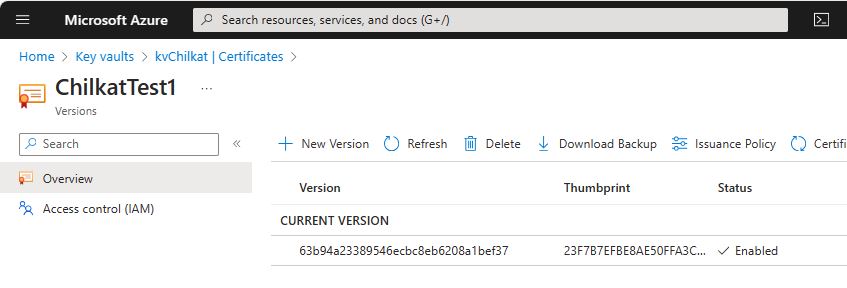 -- To sign using the Azure Key Vault,
-- add the following lines of code to specify your authentication credentials,
-- and the name of the certificate w/ private key on the Azure server to be used.
DECLARE @jsonAzure int
EXEC @hr = sp_OACreate 'Chilkat.JsonObject', @jsonAzure OUT
-- Set the "service" equal to "azure_keyvault" to tell Chilkat to use Azure Key Vault for signing.
EXEC sp_OAMethod @jsonAzure, 'UpdateString', @success OUT, 'service', 'azure_keyvault'
EXEC sp_OAMethod @jsonAzure, 'UpdateString', @success OUT, 'client_id', 'APP_ID'
EXEC sp_OAMethod @jsonAzure, 'UpdateString', @success OUT, 'client_secret', 'APP_PASSWORD'
EXEC sp_OAMethod @jsonAzure, 'UpdateString', @success OUT, 'tenant_id', 'TENANT_ID'
-- In the above screenshot, our vault name is "kvchilkat". You will use your vault name.
EXEC sp_OAMethod @jsonAzure, 'UpdateString', @success OUT, 'vault_name', 'VAULT_NAME'
-- In the above screenshot, our cert name is "ChilkatTest1". You will use your cert name.
EXEC sp_OAMethod @jsonAzure, 'UpdateString', @success OUT, 'cert_name', 'CERT_NAME'
-- In the above screenshot, our cert version is "63b94a23389546ecbc8eb6208a1bef37". You will use your cert version.
EXEC sp_OAMethod @jsonAzure, 'UpdateString', @success OUT, 'cert_version', 'CERT_VERSION'
EXEC sp_OAMethod @cert, 'SetCloudSigner', @success OUT, @jsonAzure
-- Tell the pdf object to use the certificate for signing (and for Azure Key Vault to do the actual signing of the hash).
EXEC sp_OAMethod @pdf, 'SetSigningCert', @success OUT, @cert
IF @success = 0
BEGIN
EXEC sp_OAGetProperty @pdf, 'LastErrorText', @sTmp0 OUT
PRINT @sTmp0
EXEC @hr = sp_OADestroy @pdf
EXEC @hr = sp_OADestroy @json
EXEC @hr = sp_OADestroy @cert
EXEC @hr = sp_OADestroy @jsonAzure
RETURN
END
-- Chilkat will build the signed PDF locally, but will (internally) use Azure Key Vault
-- to do the RSA (or EC) sign hash operation.
EXEC sp_OAMethod @pdf, 'SignPdf', @success OUT, @json, 'qa_output/hello_ltv_signed.pdf'
IF @success = 0
BEGIN
EXEC sp_OAGetProperty @pdf, 'LastErrorText', @sTmp0 OUT
PRINT @sTmp0
EXEC @hr = sp_OADestroy @pdf
EXEC @hr = sp_OADestroy @json
EXEC @hr = sp_OADestroy @cert
EXEC @hr = sp_OADestroy @jsonAzure
RETURN
END
PRINT 'PDF Cloud Signing using Azure Key Vault Successful.'
EXEC @hr = sp_OADestroy @pdf
EXEC @hr = sp_OADestroy @json
EXEC @hr = sp_OADestroy @cert
EXEC @hr = sp_OADestroy @jsonAzure
END
GO
-- To sign using the Azure Key Vault,
-- add the following lines of code to specify your authentication credentials,
-- and the name of the certificate w/ private key on the Azure server to be used.
DECLARE @jsonAzure int
EXEC @hr = sp_OACreate 'Chilkat.JsonObject', @jsonAzure OUT
-- Set the "service" equal to "azure_keyvault" to tell Chilkat to use Azure Key Vault for signing.
EXEC sp_OAMethod @jsonAzure, 'UpdateString', @success OUT, 'service', 'azure_keyvault'
EXEC sp_OAMethod @jsonAzure, 'UpdateString', @success OUT, 'client_id', 'APP_ID'
EXEC sp_OAMethod @jsonAzure, 'UpdateString', @success OUT, 'client_secret', 'APP_PASSWORD'
EXEC sp_OAMethod @jsonAzure, 'UpdateString', @success OUT, 'tenant_id', 'TENANT_ID'
-- In the above screenshot, our vault name is "kvchilkat". You will use your vault name.
EXEC sp_OAMethod @jsonAzure, 'UpdateString', @success OUT, 'vault_name', 'VAULT_NAME'
-- In the above screenshot, our cert name is "ChilkatTest1". You will use your cert name.
EXEC sp_OAMethod @jsonAzure, 'UpdateString', @success OUT, 'cert_name', 'CERT_NAME'
-- In the above screenshot, our cert version is "63b94a23389546ecbc8eb6208a1bef37". You will use your cert version.
EXEC sp_OAMethod @jsonAzure, 'UpdateString', @success OUT, 'cert_version', 'CERT_VERSION'
EXEC sp_OAMethod @cert, 'SetCloudSigner', @success OUT, @jsonAzure
-- Tell the pdf object to use the certificate for signing (and for Azure Key Vault to do the actual signing of the hash).
EXEC sp_OAMethod @pdf, 'SetSigningCert', @success OUT, @cert
IF @success = 0
BEGIN
EXEC sp_OAGetProperty @pdf, 'LastErrorText', @sTmp0 OUT
PRINT @sTmp0
EXEC @hr = sp_OADestroy @pdf
EXEC @hr = sp_OADestroy @json
EXEC @hr = sp_OADestroy @cert
EXEC @hr = sp_OADestroy @jsonAzure
RETURN
END
-- Chilkat will build the signed PDF locally, but will (internally) use Azure Key Vault
-- to do the RSA (or EC) sign hash operation.
EXEC sp_OAMethod @pdf, 'SignPdf', @success OUT, @json, 'qa_output/hello_ltv_signed.pdf'
IF @success = 0
BEGIN
EXEC sp_OAGetProperty @pdf, 'LastErrorText', @sTmp0 OUT
PRINT @sTmp0
EXEC @hr = sp_OADestroy @pdf
EXEC @hr = sp_OADestroy @json
EXEC @hr = sp_OADestroy @cert
EXEC @hr = sp_OADestroy @jsonAzure
RETURN
END
PRINT 'PDF Cloud Signing using Azure Key Vault Successful.'
EXEC @hr = sp_OADestroy @pdf
EXEC @hr = sp_OADestroy @json
EXEC @hr = sp_OADestroy @cert
EXEC @hr = sp_OADestroy @jsonAzure
END
GO