Ruby
Ruby
PayPal - Create Direct Credit Card Payment
See more PayPal Examples
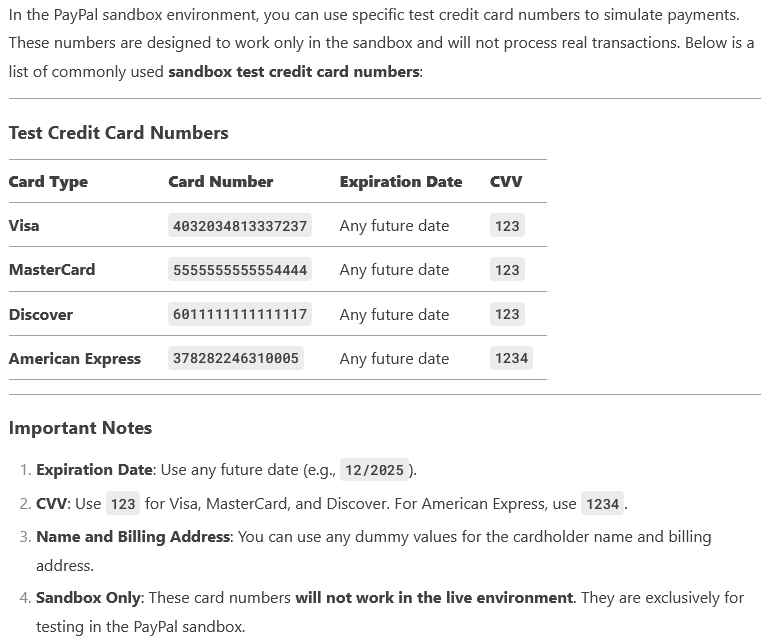
Creates a direct credit card payment where your application passes the credit card, shipping, and payment information to PayPal.Note: For sandbox calls, you can use the credit card numbers provided in your sandbox test accounts.
Note: This is an example where you handle the card data directly, and therefore you would need to ensure you are PCI compliant. There are other ways to create a payment where your application does NOT handle the credit card data directly.
Chilkat Ruby Downloads
require 'chilkat'
success = false
# Note: Requires Chilkat v9.5.0.64 or greater.
# This requires the Chilkat API to have been previously unlocked.
# See Global Unlock Sample for sample code.
# Load our previously obtained access token. (see PayPal OAuth2 Access Token)
jsonToken = Chilkat::CkJsonObject.new()
jsonToken.LoadFile("qa_data/tokens/paypal.json")
# Build the Authorization request header field value.
sbAuth = Chilkat::CkStringBuilder.new()
# token_type should be "Bearer"
sbAuth.Append(jsonToken.stringOf("token_type"))
sbAuth.Append(" ")
sbAuth.Append(jsonToken.stringOf("access_token"))
# Make the initial connection.
# A single REST object, once connected, can be used for many PayPal REST API calls.
# The auto-reconnect indicates that if the already-established HTTPS connection is closed,
# then it will be automatically re-established as needed.
rest = Chilkat::CkRest.new()
bAutoReconnect = true
success = rest.Connect("api.sandbox.paypal.com",443,true,bAutoReconnect)
if (success != true)
print rest.lastErrorText() + "\n";
exit
end
# ----------------------------------------------------------------------------------------------
# The code above this comment could be placed inside a function/subroutine within the application
# because the connection does not need to be made for every request. Once the connection is made
# the app may send many requests..
# ----------------------------------------------------------------------------------------------
# Build the JSON containing the credit card data and transaction information.
json = Chilkat::CkJsonObject.new()
json.put_EmitCompact(false)
json.UpdateString("intent","sale")
json.UpdateString("payer.payment_method","credit_card")
json.UpdateString("payer.funding_instruments[0].credit_card.number","4032034813337237")
json.UpdateString("payer.funding_instruments[0].credit_card.type","visa")
json.UpdateString("payer.funding_instruments[0].credit_card.expire_month","9")
json.UpdateString("payer.funding_instruments[0].credit_card.expire_year","2028")
json.UpdateString("payer.funding_instruments[0].credit_card.cvv2","123")
json.UpdateString("transactions[0].amount.total","10.00")
json.UpdateString("transactions[0].amount.currency","USD")
json.UpdateString("transactions[0].payee.email","payee@example.com")
# Use a sandbox CC number for testing:
#  print json.emit() + "\n";
# The JSON created by the above code is this:
# -----------------------------------------------------------------
# Ensure that payee@example.com is a valid sandbox business account
# -----------------------------------------------------------------
# {
# "intent": "sale",
# "payer": {
# "payment_method": "credit_card",
# "funding_instruments": [
# {
# "credit_card": {
# "number": "4032034813337237",
# "type": "visa",
# "expire_month": "9",
# "expire_year": "2028",
# "cvv2": "123"
# }
# }
# ]
# },
# "transactions": [
# {
# "amount": {
# "total": "10.00",
# "currency": "USD"
# },
# "payee": {
# "email": "payee@example.com"
# }
# }
# ]
# }
rest.AddHeader("Authorization",sbAuth.getAsString())
rest.AddHeader("Content-Type","application/json")
# Send the POST request containign the JSON in the request body, and get the JSON response.
sbJsonRequest = Chilkat::CkStringBuilder.new()
json.put_EmitCompact(true)
json.EmitSb(sbJsonRequest)
sbJsonResponse = Chilkat::CkStringBuilder.new()
success = rest.FullRequestSb("POST","/v1/payments/payment",sbJsonRequest,sbJsonResponse)
if (success != true)
print rest.lastErrorText() + "\n";
exit
end
json.put_EmitCompact(false)
json.LoadSb(sbJsonResponse)
print "Response Status Code = " + rest.get_ResponseStatusCode().to_s() + "\n";
# Did we get a 201 success response?
if (rest.get_ResponseStatusCode() != 201)
print json.emit() + "\n";
print "Failed." + "\n";
exit
end
# Sample response JSON is shown below.
print json.emit() + "\n";
# Demonstrate how to access a few parts of the JSON response..
print "cc number: " + json.stringOf("payer.funding_instruments[0].credit_card.number") + "\n";
print "subtotal: " + json.stringOf("transactions[0].amount.details.subtotal") + "\n";
print "refund href: " + json.stringOf("transactions[0].related_resources[0].sale.links[1].href") + "\n";
# {
# "id": "PAY-66A12106PU3254228LA3BYKI",
# "create_time": "2016-11-23T22:46:01Z",
# "update_time": "2016-11-23T22:46:07Z",
# "state": "approved",
# "intent": "sale",
# "payer": {
# "payment_method": "credit_card",
# "funding_instruments": [
# {
# "credit_card": {
# "type": "visa",
# "number": "xxxxxxxxxxxx9974",
# "expire_month": "9",
# "expire_year": "2021",
# "first_name": "Joe",
# "last_name": "Buyer"
# }
# }
# ]
# },
# "transactions": [
# {
# "amount": {
# "total": "7.47",
# "currency": "USD",
# "details": {
# "subtotal": "7.47"
# }
# },
# "description": "This is the payment transaction description.",
# "related_resources": [
# {
# "sale": {
# "id": "70L88278E6781074B",
# "create_time": "2016-11-23T22:46:01Z",
# "update_time": "2016-11-23T22:46:07Z",
# "amount": {
# "total": "7.47",
# "currency": "USD"
# },
# "state": "completed",
# "parent_payment": "PAY-66A12106PU3254228LA3BYKI",
# "links": [
# {
# "href": "https://api.sandbox.paypal.com/v1/payments/sale/70L88278E6781074B",
# "rel": "self",
# "method": "GET"
# },
# {
# "href": "https://api.sandbox.paypal.com/v1/payments/sale/70L88278E6781074B/refund",
# "rel": "refund",
# "method": "POST"
# },
# {
# "href": "https://api.sandbox.paypal.com/v1/payments/payment/PAY-66A12106PU3254228LA3BYKI",
# "rel": "parent_payment",
# "method": "GET"
# }
# ],
# "fmf_details": {},
# "processor_response": {
# "avs_code": "X",
# "cvv_code": "M"
# }
# }
# }
# ]
# }
#
# ],
# "links": [
# {
# "href": "https://api.sandbox.paypal.com/v1/payments/payment/PAY-66A12106PU3254228LA3BYKI",
# "rel": "self",
# "method": "GET"
# }
# ]
# }
#
print json.emit() + "\n";
# The JSON created by the above code is this:
# -----------------------------------------------------------------
# Ensure that payee@example.com is a valid sandbox business account
# -----------------------------------------------------------------
# {
# "intent": "sale",
# "payer": {
# "payment_method": "credit_card",
# "funding_instruments": [
# {
# "credit_card": {
# "number": "4032034813337237",
# "type": "visa",
# "expire_month": "9",
# "expire_year": "2028",
# "cvv2": "123"
# }
# }
# ]
# },
# "transactions": [
# {
# "amount": {
# "total": "10.00",
# "currency": "USD"
# },
# "payee": {
# "email": "payee@example.com"
# }
# }
# ]
# }
rest.AddHeader("Authorization",sbAuth.getAsString())
rest.AddHeader("Content-Type","application/json")
# Send the POST request containign the JSON in the request body, and get the JSON response.
sbJsonRequest = Chilkat::CkStringBuilder.new()
json.put_EmitCompact(true)
json.EmitSb(sbJsonRequest)
sbJsonResponse = Chilkat::CkStringBuilder.new()
success = rest.FullRequestSb("POST","/v1/payments/payment",sbJsonRequest,sbJsonResponse)
if (success != true)
print rest.lastErrorText() + "\n";
exit
end
json.put_EmitCompact(false)
json.LoadSb(sbJsonResponse)
print "Response Status Code = " + rest.get_ResponseStatusCode().to_s() + "\n";
# Did we get a 201 success response?
if (rest.get_ResponseStatusCode() != 201)
print json.emit() + "\n";
print "Failed." + "\n";
exit
end
# Sample response JSON is shown below.
print json.emit() + "\n";
# Demonstrate how to access a few parts of the JSON response..
print "cc number: " + json.stringOf("payer.funding_instruments[0].credit_card.number") + "\n";
print "subtotal: " + json.stringOf("transactions[0].amount.details.subtotal") + "\n";
print "refund href: " + json.stringOf("transactions[0].related_resources[0].sale.links[1].href") + "\n";
# {
# "id": "PAY-66A12106PU3254228LA3BYKI",
# "create_time": "2016-11-23T22:46:01Z",
# "update_time": "2016-11-23T22:46:07Z",
# "state": "approved",
# "intent": "sale",
# "payer": {
# "payment_method": "credit_card",
# "funding_instruments": [
# {
# "credit_card": {
# "type": "visa",
# "number": "xxxxxxxxxxxx9974",
# "expire_month": "9",
# "expire_year": "2021",
# "first_name": "Joe",
# "last_name": "Buyer"
# }
# }
# ]
# },
# "transactions": [
# {
# "amount": {
# "total": "7.47",
# "currency": "USD",
# "details": {
# "subtotal": "7.47"
# }
# },
# "description": "This is the payment transaction description.",
# "related_resources": [
# {
# "sale": {
# "id": "70L88278E6781074B",
# "create_time": "2016-11-23T22:46:01Z",
# "update_time": "2016-11-23T22:46:07Z",
# "amount": {
# "total": "7.47",
# "currency": "USD"
# },
# "state": "completed",
# "parent_payment": "PAY-66A12106PU3254228LA3BYKI",
# "links": [
# {
# "href": "https://api.sandbox.paypal.com/v1/payments/sale/70L88278E6781074B",
# "rel": "self",
# "method": "GET"
# },
# {
# "href": "https://api.sandbox.paypal.com/v1/payments/sale/70L88278E6781074B/refund",
# "rel": "refund",
# "method": "POST"
# },
# {
# "href": "https://api.sandbox.paypal.com/v1/payments/payment/PAY-66A12106PU3254228LA3BYKI",
# "rel": "parent_payment",
# "method": "GET"
# }
# ],
# "fmf_details": {},
# "processor_response": {
# "avs_code": "X",
# "cvv_code": "M"
# }
# }
# }
# ]
# }
#
# ],
# "links": [
# {
# "href": "https://api.sandbox.paypal.com/v1/payments/payment/PAY-66A12106PU3254228LA3BYKI",
# "rel": "self",
# "method": "GET"
# }
# ]
# }
#