CkPython
CkPython
Firebase DELETE - Removing Data
See more Firebase Examples
Uses the DELETE method to delete data. The data used in this example is at Chilkat Firebase Pigs Database, and is shown here: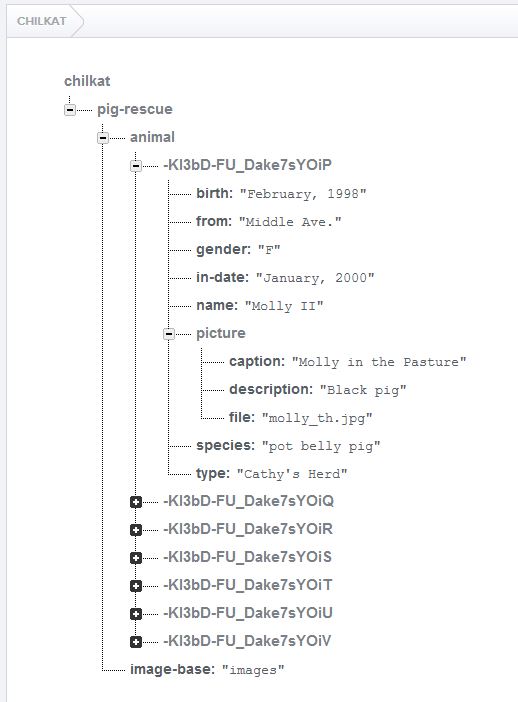
Chilkat CkPython Downloads
import sys
import chilkat

success = False

# Uses the DELETE method to delete a Firebase record.

# This example requires the Chilkat API to have been previously unlocked.
# See Global Unlock Sample for sample code.

# This example assumes a JWT authentication token, if required, has been previously obtained.
# See Get Firebase Access Token from JSON Service Account Private Key for sample code.

# Load the previously obtained Firebase access token into a string.
fac = chilkat.CkFileAccess()
accessToken = fac.readEntireTextFile("qa_data/tokens/firebaseToken.txt","utf-8")
if (fac.get_LastMethodSuccess() != True):
    print(fac.lastErrorText())
    sys.exit()

rest = chilkat.CkRest()

# Make the initial connection (without sending a request yet).
# Once connected, any number of requests may be sent.  It is not necessary to explicitly
# call Connect before each request.
success = rest.Connect("chilkat.firebaseio.com",443,True,True)
if (success != True):
    print(rest.lastErrorText())
    sys.exit()

authGoogle = chilkat.CkAuthGoogle()
authGoogle.put_AccessToken(accessToken)
rest.SetAuthGoogle(authGoogle)

# Chilkat's sample data (pig-rescue data) is publicly readable at: https://chilkat.firebaseio.com/.json
# This data is publicly readable, but not writable.  You'll need to
# run against your own database..

# We're going to delete a pig we previously added.  The push ID of that pig was -KI3pT33wKauiMxY4QTB,
# so the path will be "/pig-rescue/animal/-KI3pT33wKauiMxY4QTB.json"

jsonResponse = rest.fullRequestNoBody("DELETE","/pig-rescue/animal/-KI3pT33wKauiMxY4QTB.json")
if (rest.get_LastMethodSuccess() != True):
    # Something happened in the communications (either no request was sent, or no response was received.
    # (The Chilkat REST API also has lower-level methods where an app can send the request in one call,
    # and then receive the response in another call.)
    print(rest.lastErrorText())
    sys.exit()

# Check the response status code.   A 200 response status indicates success.
if (rest.get_ResponseStatusCode() != 200):
    print(rest.responseStatusText())
    print(jsonResponse)
    print("Failed.")
    sys.exit()

print("Success.")