Objective-C Requires Chilkat v11.7.0+
Objective-C
Generate a QR Code PNG in Memory
See more QR Code Examples
Demonstrates getting a QR code image without writing a file. With no output options the result is a PNG returned as base64 in outputs[0].base64 of the response. The example decodes it into a BinData, which holds the bytes of the PNG to send in an HTTP response, store in a database, attach to an email, or save.Chilkat Objective-C Downloads
#import <CkoJsonObject.h>
#import <CkoFormats.h>
#import <CkoBinData.h>
BOOL success = NO;
// This example requires the Chilkat API to have been previously unlocked.
// See Global Unlock Sample for sample code.
CkoJsonObject *json = [[CkoJsonObject alloc] init];
[json UpdateString: @"payload.text" value: @"https://www.chilkatsoft.com/"];
[json UpdateInt: @"render.moduleSize" value: [NSNumber numberWithInt: 6]];
CkoFormats *fmt = [[CkoFormats alloc] init];
CkoJsonObject *jsonOut = [[CkoJsonObject alloc] init];
success = [fmt QrCode: @"generate" jsonIn: json jsonOut: jsonOut];
if (success == NO) {
NSLog(@"%@",fmt.LastErrorText);
return;
}
NSLog(@"%@%@",@"format: ",[jsonOut StringOf: @"outputs[0].format"]);
NSLog(@"%@%@",@"MIME type: ",[jsonOut StringOf: @"outputs[0].mimeType"]);
NSLog(@"%@%d%@%d%@",@"image: ",[[jsonOut IntOf: @"outputs[0].width"] intValue],@" x ",[[jsonOut IntOf: @"outputs[0].height"] intValue],@" pixels");
// outputs[0].base64 is the PNG file, base64 encoded.
CkoBinData *bdPng = [[CkoBinData alloc] init];
success = [bdPng AppendEncoded: [jsonOut StringOf: @"outputs[0].base64"] encoding: @"base64"];
if (success == NO) {
NSLog(@"%@",bdPng.LastErrorText);
return;
}
NSLog(@"%@%d",@"PNG bytes: ",[bdPng.NumBytes intValue]);
// The BinData holds the image. Here it is simply saved.
success = [bdPng WriteFile: @"qa_output/qr_in_memory.png"];
if (success == NO) {
NSLog(@"%@",bdPng.LastErrorText);
return;
}
// The PNG held in bdPng:
// 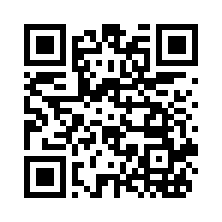 // Sample output:
// format: png
// MIME type: image/png
// image: 222 x 222 pixels
// PNG bytes: 877