Delphi DLL
Delphi DLL
PayPal - Create Direct Credit Card Payment
See more PayPal Examples
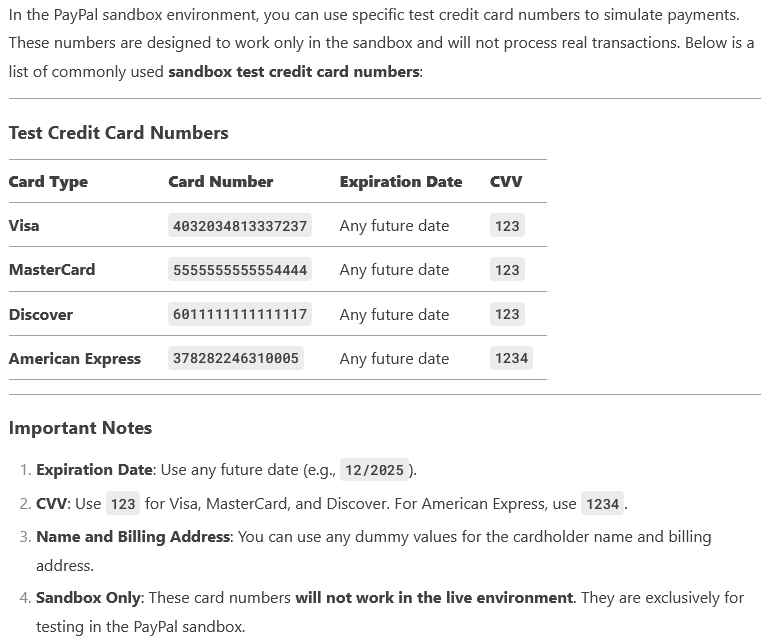
Creates a direct credit card payment where your application passes the credit card, shipping, and payment information to PayPal.Note: For sandbox calls, you can use the credit card numbers provided in your sandbox test accounts.
Note: This is an example where you handle the card data directly, and therefore you would need to ensure you are PCI compliant. There are other ways to create a payment where your application does NOT handle the credit card data directly.
Chilkat Delphi DLL Downloads
uses
Winapi.Windows, Winapi.Messages, System.SysUtils, System.Variants, System.Classes, Vcl.Graphics,
Vcl.Controls, Vcl.Forms, Vcl.Dialogs, Vcl.StdCtrls, StringBuilder, Rest, JsonObject;
...
procedure TForm1.Button1Click(Sender: TObject);
var
success: Boolean;
jsonToken: HCkJsonObject;
sbAuth: HCkStringBuilder;
rest: HCkRest;
bAutoReconnect: Boolean;
json: HCkJsonObject;
sbJsonRequest: HCkStringBuilder;
sbJsonResponse: HCkStringBuilder;
begin
success := False;
// Note: Requires Chilkat v9.5.0.64 or greater.
// This requires the Chilkat API to have been previously unlocked.
// See Global Unlock Sample for sample code.
// Load our previously obtained access token. (see PayPal OAuth2 Access Token)
jsonToken := CkJsonObject_Create();
CkJsonObject_LoadFile(jsonToken,'qa_data/tokens/paypal.json');
// Build the Authorization request header field value.
sbAuth := CkStringBuilder_Create();
// token_type should be "Bearer"
CkStringBuilder_Append(sbAuth,CkJsonObject__stringOf(jsonToken,'token_type'));
CkStringBuilder_Append(sbAuth,' ');
CkStringBuilder_Append(sbAuth,CkJsonObject__stringOf(jsonToken,'access_token'));
// Make the initial connection.
// A single REST object, once connected, can be used for many PayPal REST API calls.
// The auto-reconnect indicates that if the already-established HTTPS connection is closed,
// then it will be automatically re-established as needed.
rest := CkRest_Create();
bAutoReconnect := True;
success := CkRest_Connect(rest,'api.sandbox.paypal.com',443,True,bAutoReconnect);
if (success <> True) then
begin
Memo1.Lines.Add(CkRest__lastErrorText(rest));
Exit;
end;
// ----------------------------------------------------------------------------------------------
// The code above this comment could be placed inside a function/subroutine within the application
// because the connection does not need to be made for every request. Once the connection is made
// the app may send many requests..
// ----------------------------------------------------------------------------------------------
// Build the JSON containing the credit card data and transaction information.
json := CkJsonObject_Create();
CkJsonObject_putEmitCompact(json,False);
CkJsonObject_UpdateString(json,'intent','sale');
CkJsonObject_UpdateString(json,'payer.payment_method','credit_card');
CkJsonObject_UpdateString(json,'payer.funding_instruments[0].credit_card.number','4032034813337237');
CkJsonObject_UpdateString(json,'payer.funding_instruments[0].credit_card.type','visa');
CkJsonObject_UpdateString(json,'payer.funding_instruments[0].credit_card.expire_month','9');
CkJsonObject_UpdateString(json,'payer.funding_instruments[0].credit_card.expire_year','2028');
CkJsonObject_UpdateString(json,'payer.funding_instruments[0].credit_card.cvv2','123');
CkJsonObject_UpdateString(json,'transactions[0].amount.total','10.00');
CkJsonObject_UpdateString(json,'transactions[0].amount.currency','USD');
CkJsonObject_UpdateString(json,'transactions[0].payee.email','payee@example.com');
// Use a sandbox CC number for testing:
//  Memo1.Lines.Add(CkJsonObject__emit(json));
// The JSON created by the above code is this:
// -----------------------------------------------------------------
// Ensure that payee@example.com is a valid sandbox business account
// -----------------------------------------------------------------
// {
// "intent": "sale",
// "payer": {
// "payment_method": "credit_card",
// "funding_instruments": [
// {
// "credit_card": {
// "number": "4032034813337237",
// "type": "visa",
// "expire_month": "9",
// "expire_year": "2028",
// "cvv2": "123"
// }
// }
// ]
// },
// "transactions": [
// {
// "amount": {
// "total": "10.00",
// "currency": "USD"
// },
// "payee": {
// "email": "payee@example.com"
// }
// }
// ]
// }
CkRest_AddHeader(rest,'Authorization',CkStringBuilder__getAsString(sbAuth));
CkRest_AddHeader(rest,'Content-Type','application/json');
// Send the POST request containign the JSON in the request body, and get the JSON response.
sbJsonRequest := CkStringBuilder_Create();
CkJsonObject_putEmitCompact(json,True);
CkJsonObject_EmitSb(json,sbJsonRequest);
sbJsonResponse := CkStringBuilder_Create();
success := CkRest_FullRequestSb(rest,'POST','/v1/payments/payment',sbJsonRequest,sbJsonResponse);
if (success <> True) then
begin
Memo1.Lines.Add(CkRest__lastErrorText(rest));
Exit;
end;
CkJsonObject_putEmitCompact(json,False);
CkJsonObject_LoadSb(json,sbJsonResponse);
Memo1.Lines.Add('Response Status Code = ' + IntToStr(CkRest_getResponseStatusCode(rest)));
// Did we get a 201 success response?
if (CkRest_getResponseStatusCode(rest) <> 201) then
begin
Memo1.Lines.Add(CkJsonObject__emit(json));
Memo1.Lines.Add('Failed.');
Exit;
end;
// Sample response JSON is shown below.
Memo1.Lines.Add(CkJsonObject__emit(json));
// Demonstrate how to access a few parts of the JSON response..
Memo1.Lines.Add('cc number: ' + CkJsonObject__stringOf(json,'payer.funding_instruments[0].credit_card.number'));
Memo1.Lines.Add('subtotal: ' + CkJsonObject__stringOf(json,'transactions[0].amount.details.subtotal'));
Memo1.Lines.Add('refund href: ' + CkJsonObject__stringOf(json,'transactions[0].related_resources[0].sale.links[1].href'));
// {
// "id": "PAY-66A12106PU3254228LA3BYKI",
// "create_time": "2016-11-23T22:46:01Z",
// "update_time": "2016-11-23T22:46:07Z",
// "state": "approved",
// "intent": "sale",
// "payer": {
// "payment_method": "credit_card",
// "funding_instruments": [
// {
// "credit_card": {
// "type": "visa",
// "number": "xxxxxxxxxxxx9974",
// "expire_month": "9",
// "expire_year": "2021",
// "first_name": "Joe",
// "last_name": "Buyer"
// }
// }
// ]
// },
// "transactions": [
// {
// "amount": {
// "total": "7.47",
// "currency": "USD",
// "details": {
// "subtotal": "7.47"
// }
// },
// "description": "This is the payment transaction description.",
// "related_resources": [
// {
// "sale": {
// "id": "70L88278E6781074B",
// "create_time": "2016-11-23T22:46:01Z",
// "update_time": "2016-11-23T22:46:07Z",
// "amount": {
// "total": "7.47",
// "currency": "USD"
// },
// "state": "completed",
// "parent_payment": "PAY-66A12106PU3254228LA3BYKI",
// "links": [
// {
// "href": "https://api.sandbox.paypal.com/v1/payments/sale/70L88278E6781074B",
// "rel": "self",
// "method": "GET"
// },
// {
// "href": "https://api.sandbox.paypal.com/v1/payments/sale/70L88278E6781074B/refund",
// "rel": "refund",
// "method": "POST"
// },
// {
// "href": "https://api.sandbox.paypal.com/v1/payments/payment/PAY-66A12106PU3254228LA3BYKI",
// "rel": "parent_payment",
// "method": "GET"
// }
// ],
// "fmf_details": {},
// "processor_response": {
// "avs_code": "X",
// "cvv_code": "M"
// }
// }
// }
// ]
// }
//
// ],
// "links": [
// {
// "href": "https://api.sandbox.paypal.com/v1/payments/payment/PAY-66A12106PU3254228LA3BYKI",
// "rel": "self",
// "method": "GET"
// }
// ]
// }
//
CkJsonObject_Dispose(jsonToken);
CkStringBuilder_Dispose(sbAuth);
CkRest_Dispose(rest);
CkJsonObject_Dispose(json);
CkStringBuilder_Dispose(sbJsonRequest);
CkStringBuilder_Dispose(sbJsonResponse);
end;
Memo1.Lines.Add(CkJsonObject__emit(json));
// The JSON created by the above code is this:
// -----------------------------------------------------------------
// Ensure that payee@example.com is a valid sandbox business account
// -----------------------------------------------------------------
// {
// "intent": "sale",
// "payer": {
// "payment_method": "credit_card",
// "funding_instruments": [
// {
// "credit_card": {
// "number": "4032034813337237",
// "type": "visa",
// "expire_month": "9",
// "expire_year": "2028",
// "cvv2": "123"
// }
// }
// ]
// },
// "transactions": [
// {
// "amount": {
// "total": "10.00",
// "currency": "USD"
// },
// "payee": {
// "email": "payee@example.com"
// }
// }
// ]
// }
CkRest_AddHeader(rest,'Authorization',CkStringBuilder__getAsString(sbAuth));
CkRest_AddHeader(rest,'Content-Type','application/json');
// Send the POST request containign the JSON in the request body, and get the JSON response.
sbJsonRequest := CkStringBuilder_Create();
CkJsonObject_putEmitCompact(json,True);
CkJsonObject_EmitSb(json,sbJsonRequest);
sbJsonResponse := CkStringBuilder_Create();
success := CkRest_FullRequestSb(rest,'POST','/v1/payments/payment',sbJsonRequest,sbJsonResponse);
if (success <> True) then
begin
Memo1.Lines.Add(CkRest__lastErrorText(rest));
Exit;
end;
CkJsonObject_putEmitCompact(json,False);
CkJsonObject_LoadSb(json,sbJsonResponse);
Memo1.Lines.Add('Response Status Code = ' + IntToStr(CkRest_getResponseStatusCode(rest)));
// Did we get a 201 success response?
if (CkRest_getResponseStatusCode(rest) <> 201) then
begin
Memo1.Lines.Add(CkJsonObject__emit(json));
Memo1.Lines.Add('Failed.');
Exit;
end;
// Sample response JSON is shown below.
Memo1.Lines.Add(CkJsonObject__emit(json));
// Demonstrate how to access a few parts of the JSON response..
Memo1.Lines.Add('cc number: ' + CkJsonObject__stringOf(json,'payer.funding_instruments[0].credit_card.number'));
Memo1.Lines.Add('subtotal: ' + CkJsonObject__stringOf(json,'transactions[0].amount.details.subtotal'));
Memo1.Lines.Add('refund href: ' + CkJsonObject__stringOf(json,'transactions[0].related_resources[0].sale.links[1].href'));
// {
// "id": "PAY-66A12106PU3254228LA3BYKI",
// "create_time": "2016-11-23T22:46:01Z",
// "update_time": "2016-11-23T22:46:07Z",
// "state": "approved",
// "intent": "sale",
// "payer": {
// "payment_method": "credit_card",
// "funding_instruments": [
// {
// "credit_card": {
// "type": "visa",
// "number": "xxxxxxxxxxxx9974",
// "expire_month": "9",
// "expire_year": "2021",
// "first_name": "Joe",
// "last_name": "Buyer"
// }
// }
// ]
// },
// "transactions": [
// {
// "amount": {
// "total": "7.47",
// "currency": "USD",
// "details": {
// "subtotal": "7.47"
// }
// },
// "description": "This is the payment transaction description.",
// "related_resources": [
// {
// "sale": {
// "id": "70L88278E6781074B",
// "create_time": "2016-11-23T22:46:01Z",
// "update_time": "2016-11-23T22:46:07Z",
// "amount": {
// "total": "7.47",
// "currency": "USD"
// },
// "state": "completed",
// "parent_payment": "PAY-66A12106PU3254228LA3BYKI",
// "links": [
// {
// "href": "https://api.sandbox.paypal.com/v1/payments/sale/70L88278E6781074B",
// "rel": "self",
// "method": "GET"
// },
// {
// "href": "https://api.sandbox.paypal.com/v1/payments/sale/70L88278E6781074B/refund",
// "rel": "refund",
// "method": "POST"
// },
// {
// "href": "https://api.sandbox.paypal.com/v1/payments/payment/PAY-66A12106PU3254228LA3BYKI",
// "rel": "parent_payment",
// "method": "GET"
// }
// ],
// "fmf_details": {},
// "processor_response": {
// "avs_code": "X",
// "cvv_code": "M"
// }
// }
// }
// ]
// }
//
// ],
// "links": [
// {
// "href": "https://api.sandbox.paypal.com/v1/payments/payment/PAY-66A12106PU3254228LA3BYKI",
// "rel": "self",
// "method": "GET"
// }
// ]
// }
//
CkJsonObject_Dispose(jsonToken);
CkStringBuilder_Dispose(sbAuth);
CkRest_Dispose(rest);
CkJsonObject_Dispose(json);
CkStringBuilder_Dispose(sbJsonRequest);
CkStringBuilder_Dispose(sbJsonResponse);
end;