Delphi DLL
Delphi DLL
Firebase PUT - Writing Data
See more Firebase Examples
Demonstrates how to PUT new data to a Firebase JSON database. The data used in this example is at Chilkat Firebase Pigs Database, and is shown here: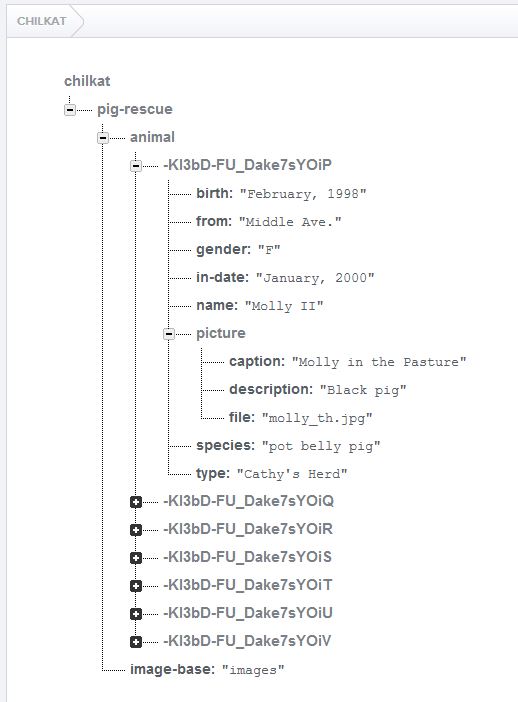
Chilkat Delphi DLL Downloads
uses
    Winapi.Windows, Winapi.Messages, System.SysUtils, System.Variants, System.Classes, Vcl.Graphics,
    Vcl.Controls, Vcl.Forms, Vcl.Dialogs, Vcl.StdCtrls, AuthGoogle, Prng, FileAccess, Rest, JsonObject, StringBuilder;

...

procedure TForm1.Button1Click(Sender: TObject);
var
success: Boolean;
fac: HCkFileAccess;
accessToken: PWideChar;
rest: HCkRest;
authGoogle: HCkAuthGoogle;
prng: HCkPrng;
pushId: PWideChar;
pigRecord: HCkJsonObject;
path: HCkStringBuilder;
jsonResponse: PWideChar;

begin
success := False;

// Demonstrates how to PUT new data to a Firebase JSON database.

// This example requires the Chilkat API to have been previously unlocked.
// See Global Unlock Sample for sample code.

// This example assumes a JWT authentication token, if required, has been previously obtained.
// See Get Firebase Access Token from JSON Service Account Private Key for sample code.

// Load the previously obtained Firebase access token into a string.
fac := CkFileAccess_Create();
accessToken := CkFileAccess__readEntireTextFile(fac,'qa_data/tokens/firebaseToken.txt','utf-8');
if (CkFileAccess_getLastMethodSuccess(fac) <> True) then
  begin
    Memo1.Lines.Add(CkFileAccess__lastErrorText(fac));
    Exit;
  end;

rest := CkRest_Create();

// Make the initial connection (without sending a request yet).
// Once connected, any number of requests may be sent.  It is not necessary to explicitly
// call Connect before each request.
success := CkRest_Connect(rest,'chilkat.firebaseio.com',443,True,True);
if (success <> True) then
  begin
    Memo1.Lines.Add(CkRest__lastErrorText(rest));
    Exit;
  end;
authGoogle := CkAuthGoogle_Create();
CkAuthGoogle_putAccessToken(authGoogle,accessToken);
CkRest_SetAuthGoogle(rest,authGoogle);

// Chilkat's sample data (pig-rescue data) is publicly readable at: https://chilkat.firebaseio.com/.json
// This data is publicly readable, but not writable.  You'll need to
// run against your own database..

// Generate a new push ID.
prng := CkPrng_Create();
pushId := CkPrng__firebasePushId(prng);

// We're going to add a new pig with just the name.
pigRecord := CkJsonObject_Create();
CkJsonObject_AppendString(pigRecord,'name','William');

path := CkStringBuilder_Create();
CkStringBuilder_Append(path,'/pig-rescue/animal/');
CkStringBuilder_Append(path,pushId);
CkStringBuilder_Append(path,'.json');

// The string content of the last arg passed is  {"name":"William"}
jsonResponse := CkRest__fullRequestString(rest,'PUT',CkStringBuilder__getAsString(path),CkJsonObject__emit(pigRecord));
if (CkRest_getLastMethodSuccess(rest) <> True) then
  begin
    // Something happened in the communications (either no request was sent, or no response was received.
    // (The Chilkat REST API also has lower-level methods where an app can send the request in one call,
    // and then receive the response in another call.)
    Memo1.Lines.Add(CkRest__lastErrorText(rest));
    Exit;
  end;

// Check the response status code.   A 200 response status indicates success.
if (CkRest_getResponseStatusCode(rest) <> 200) then
  begin
    Memo1.Lines.Add(CkRest__responseStatusText(rest));
    Memo1.Lines.Add(jsonResponse);
    Memo1.Lines.Add('Failed.');
    Exit;
  end;

Memo1.Lines.Add(jsonResponse);
Memo1.Lines.Add('Success.');

// Note: In many of the Chilkat examples, you may notice strange ways
// of doing something that should be simpler and shorter.  For example,
// building the path (above) could've been written differently,
// with some simple string concatenation.
//
// The reason is that the Chilkat examples are written in a
// proprietary "example code" scripting language,
// and then automatically generated to each of the different programming
// languages you see on example-code.com.  The code generation is
// limited in what it can do.  For example, string concatentation
// is not yet a feature of the "example code" scripting language (as of May 2016),
// and therefore you won't see the use of a programming language's string
// concatentation operators in any example.
//

CkFileAccess_Dispose(fac);
CkRest_Dispose(rest);
CkAuthGoogle_Dispose(authGoogle);
CkPrng_Dispose(prng);
CkJsonObject_Dispose(pigRecord);
CkStringBuilder_Dispose(path);

end;