Delphi DLL
Delphi DLL
Dropbox: Access Your Own Account
See more Dropbox Examples
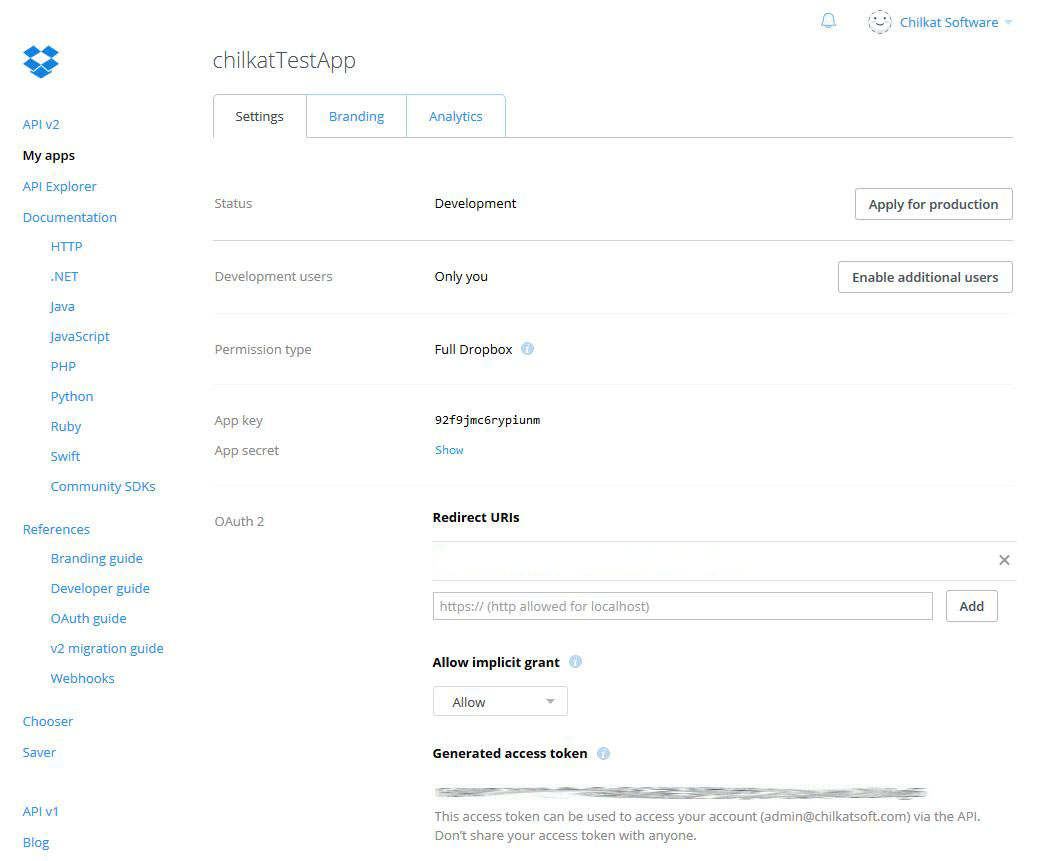
To programmatically interact with your own Dropbox account, such as for uploading, downloading, listing files, etc., go to the Dropbox app console and create an application. Then generate an access token in the online app console as shown in the screenshot below. The access token does not expire, and can be used to access your own account from your own non-web application.The example code, located below the screenshot, shows how to list the files in the root folder.
Chilkat Delphi DLL Downloads
uses
    Winapi.Windows, Winapi.Messages, System.SysUtils, System.Variants, System.Classes, Vcl.Graphics,
    Vcl.Controls, Vcl.Forms, Vcl.Dialogs, Vcl.StdCtrls, Rest, DtObj, JsonObject, CkDateTime;

...

procedure TForm1.Button1Click(Sender: TObject);
var
success: Boolean;
rest: HCkRest;
bTls: Boolean;
port: Integer;
bAutoReconnect: Boolean;
json: HCkJsonObject;
responseStr: PWideChar;
jsonResponse: HCkJsonObject;
dt: HCkDtObj;
numEntries: Integer;
i: Integer;
ckdt: HCkDateTime;
bLocalDateTime: Boolean;

begin
success := False;

// This example requires the Chilkat API to have been previously unlocked.
// See Global Unlock Sample for sample code.

rest := CkRest_Create();

// Connect to the www.dropbox.com endpoint.
bTls := True;
port := 443;
bAutoReconnect := True;
success := CkRest_Connect(rest,'api.dropboxapi.com',port,bTls,bAutoReconnect);
if (success = False) then
  begin
    Memo1.Lines.Add(CkRest__lastErrorText(rest));
    Exit;
  end;

CkRest_AddHeader(rest,'Content-Type','application/json');
CkRest_AddHeader(rest,'Authorization','Bearer DROPBOX-ACCESS-TOKEN');

json := CkJsonObject_Create();
// The root folder should be an empty string, not "/"
CkJsonObject_AppendString(json,'path','');
CkJsonObject_AppendBool(json,'recursive',False);
CkJsonObject_AppendBool(json,'include_media_info',False);
CkJsonObject_AppendBool(json,'include_deleted',False);
CkJsonObject_AppendBool(json,'include_has_explicit_shared_members',False);

responseStr := CkRest__fullRequestString(rest,'POST','/2/files/list_folder',CkJsonObject__emit(json));
if (CkRest_getLastMethodSuccess(rest) = False) then
  begin
    Memo1.Lines.Add(CkRest__lastErrorText(rest));
    Exit;
  end;

// Success is indicated by a 200 response status code.
if (CkRest_getResponseStatusCode(rest) <> 200) then
  begin
    // Examine the request/response to see what happened.
    Memo1.Lines.Add('response status code = ' + IntToStr(CkRest_getResponseStatusCode(rest)));
    Memo1.Lines.Add('response status text = ' + CkRest__responseStatusText(rest));
    Memo1.Lines.Add('response header: ' + CkRest__responseHeader(rest));
    Memo1.Lines.Add('response body (if any): ' + responseStr);
    Memo1.Lines.Add('---');
    Memo1.Lines.Add('LastRequestStartLine: ' + CkRest__lastRequestStartLine(rest));
    Memo1.Lines.Add('LastRequestHeader: ' + CkRest__lastRequestHeader(rest));
    Exit;
  end;

jsonResponse := CkJsonObject_Create();
CkJsonObject_Load(jsonResponse,responseStr);

CkJsonObject_putEmitCompact(jsonResponse,False);
Memo1.Lines.Add(CkJsonObject__emit(jsonResponse));

// A sample JSON response is shown at the end of this example.
// The following code iterates over the entries.
dt := CkDtObj_Create();
numEntries := CkJsonObject_SizeOfArray(jsonResponse,'entries');
i := 0;
while i < numEntries do
  begin
    CkJsonObject_putI(jsonResponse,i);
    Memo1.Lines.Add('----');
    Memo1.Lines.Add('name: ' + CkJsonObject__stringOf(jsonResponse,'entries[i].name'));
    Memo1.Lines.Add('path_lower: ' + CkJsonObject__stringOf(jsonResponse,'entries[i].path_lower'));
    Memo1.Lines.Add('path_display: ' + CkJsonObject__stringOf(jsonResponse,'entries[i].path_display'));
    if (CkJsonObject_HasMember(jsonResponse,'entries[i].sharing_info') = True) then
      begin
        Memo1.Lines.Add('has sharing_info...');
        Memo1.Lines.Add('read_only: ' + CkJsonObject__stringOf(jsonResponse,'entries[i].sharing_info.read_only'));
        Memo1.Lines.Add('shared_folder_id: ' + CkJsonObject__stringOf(jsonResponse,'entries[i].sharing_info.shared_folder_id'));
      end;
    if (CkJsonObject_HasMember(jsonResponse,'entries[i].client_modified') = True) then
      begin
        // Demonstrate how to parse a date/time:
        ckdt := CkDateTime_Create();
        success := CkDateTime_SetFromTimestamp(ckdt,CkJsonObject__stringOf(jsonResponse,'entries[i].client_modified'));
        // The date/time can now be converted to many other formats, or the individual parts
        // can be accessed.
        bLocalDateTime := True;
        CkDateTime_ToDtObj(ckdt,bLocalDateTime,dt);

        Memo1.Lines.Add(IntToStr(CkDtObj_getYear(dt)) + '-' + IntToStr(CkDtObj_getMonth(dt)) + '-' + IntToStr(CkDtObj_getDay(dt)));
      end;
    i := i + 1;
  end;

Memo1.Lines.Add('Success.');

// {
//   "entries": [
//     {
//       ".tag": "folder",
//       "name": "chilkat Team Folder",
//       "path_lower": "/chilkat team folder",
//       "path_display": "/chilkat Team Folder",
//       "id": "id:2VqX9RLr-JAAAAAAAAAAAQ",
//       "shared_folder_id": "1210954290",
//       "sharing_info": {
//         "read_only": false,
//         "shared_folder_id": "1210954290"
//       }
//     },
//     {
//       ".tag": "file",
//       "name": "Get Started with Dropbox.pdf",
//       "path_lower": "/get started with dropbox.pdf",
//       "path_display": "/Get Started with Dropbox.pdf",
//       "id": "id:oxE2oMDqH4AAAAAAAAAAAQ",
//       "client_modified": "2016-05-07T11:47:47Z",
//       "server_modified": "2016-05-07T11:47:47Z",
//       "rev": "1483db13f",
//       "size": 692088
//     }
//   ],
//   "cursor": "AAEnZXciJyS4gzC_tlX6K2na4c8o7_09-dxmXKHpkPPyf3Kl0H4N-VYnz424nCrFOJuhMiM5_RgNAersumx9qe7NgCSdlppr80iFk0gf6vPlecM6SBtLcs6OYXL8ILWiZ62pfnOvgC3WKGlG6dqZ-VXH",
//   "has_more": false
// }
//

CkRest_Dispose(rest);
CkJsonObject_Dispose(json);
CkJsonObject_Dispose(jsonResponse);
CkDtObj_Dispose(dt);
        CkDateTime_Dispose(ckdt);

end;